


Real-Time Monitoring

Custom Checks

Daily Checks

Error-Free Onboarding
SAP system monitoring automation is the scheduled, rule-based collection and evaluation of health data across every layer of an SAP system: operating system, database, application instances, business processes, interfaces, and security settings. Checks run automatically against defined thresholds and raise alerts without a Basis engineer executing each one by hand.
Two check modes cover the full workload. Real-time monitoring runs continuously and alerts within minutes of a threshold breach. Daily checks run on a schedule you define and produce the evidence your team currently gathers by hand each morning.
Avantra applies more than 160 built-in best-practice checks across your SAP estate, adds custom checks for site-specific conditions, and onboards new systems automatically. Native checks are included for SAP S/4HANA and SAP BusinessObjects, and monitoring extends to non-SAP applications sharing the same service chain.
|
Avantra cuts the hours SAP teams spend on daily system checks by at least 25 percent. The saving comes from three mechanisms: checks execute without manual initiation, results arrive pre-evaluated against thresholds, and new systems onboard automatically instead of through per-system configuration. |
What SAP System Monitoring Automation Covers
Avantra monitors every layer supporting an SAP service, not the application layer alone. Most SAP incidents originate below the application. A check set limited to SAP instances leaves the operating system, database, and interface layers unwatched, which is where the majority of incident root causes sit. The table below shows what Avantra monitors and how often.
| Layer | What is monitored | Check mode | Typical signals |
|---|---|---|---|
| Operating system | CPU, memory, swap, filesystem capacity, process availability, OS-level errors | Real-time and daily | Filesystem at threshold, host unreachable |
| Database | Availability, space, log growth, backup success, performance counters, replication state | Real-time and daily | Backup failure, tablespace growth, log full |
| SAP application | Instance and work process availability, short dumps, update errors, lock entries, enqueue health | Real-time | ABAP dumps rising, update deactivated, work processes exhausted |
| SAP HANA | Memory consumption, delta merge, alerts, service availability, replication status | Real-time and daily | Memory near limit, service restart, replication lag |
| Background processing | Batch job status, runtime deviation, job chain dependencies, queue depth | Real-time and daily | Job cancelled, runtime exceeds baseline |
| Interfaces | IDoc status, RFC destinations, queue backlogs, connectivity between systems | Real-time | IDocs in error, queue stuck, destination unreachable |
| Business processes | End-to-end process health across the systems supporting a business service | Real-time | Order flow interrupted at an interface step |
| Security and compliance | Security notes status, certificate expiry, parameter drift, user and authorization settings | Daily | Certificate expiring, security note unapplied |
| S/4HANA and BusinessObjects | Native product-specific checks shipped with the platform | Real-time and daily | Product-specific health thresholds |
| Non-SAP applications | Third-party applications and services in the same estate | Real-time and daily | Dependent service down |
| Custom checks | Any site-specific condition you define, including custom tables and bespoke interfaces | Real-time or daily | Z-table threshold breached |
Deeper coverage by area: SAP Basis monitoring, SAP HANA monitoring, business process monitoring, SAP compliance and audit readiness, and SAP automation for MSPs.
Real-Time SAP System Monitoring
Prevent failures with continuous real-time SAP system monitoring
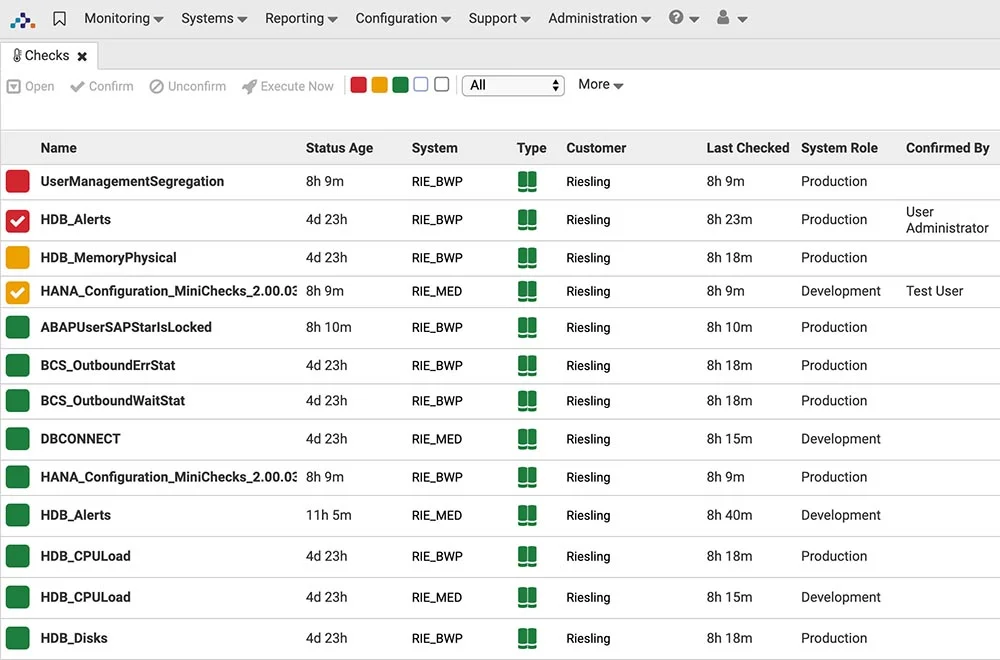
Avantra’s real-time monitoring includes more than 160 built-in checks, freeing your IT team from dependence on Solution Manager and other SAP tools. Avantra can monitor not only the OS, database, applications, and servers but also business processes, security and much more—even non-SAP-related third-party applications. Built to allow continuous, automated system monitoring, Avantra saves at least 25 percent of the hours your team would typically spend on daily checks. We’ve even included native checks for technologies such as SAP S/4 HANA and SAP Business Objects.
Custom Checks
Take SAP system monitoring tools to a new level—your own.
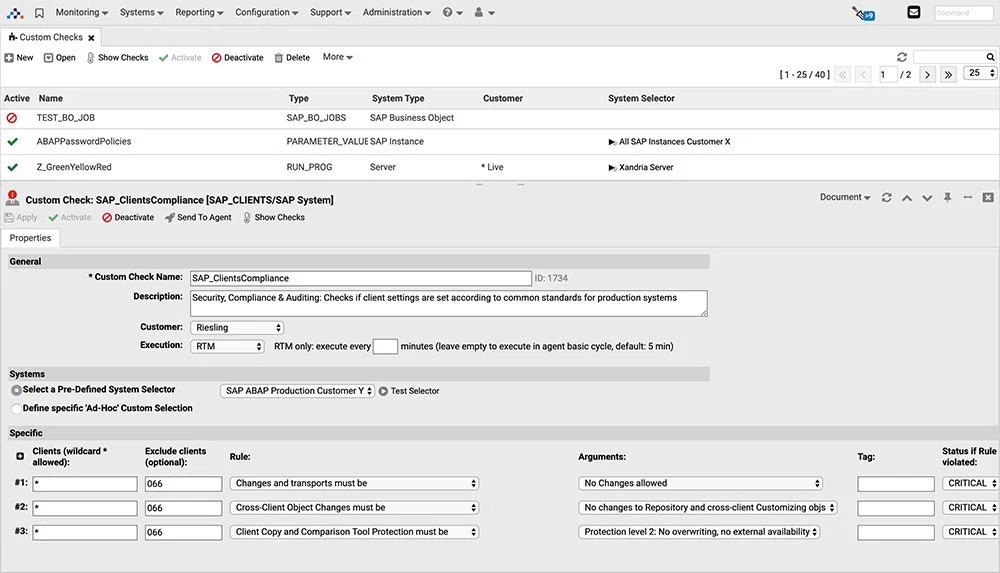
Get ready for ultimate flexibility in SAP system monitoring tools. Every landscape is unique, and so are its monitoring needs. So, in addition to the 160+ built-in best-practice checks, Avantra allows you to easily add custom checks to address your organization’s most unique and specific monitoring requirements. Avantra provides real-time insights into system and element performance monitoring and health checks, business process monitoring, security and compliance monitoring, and much more. Custom checks are so flexible that there’s never been a monitoring request Avantra couldn’t take on—even with thousands of Avantra systems (and millions of checks running daily) around the world.
Daily Checks: Automate the Morning Check Round
Decide which checks you need and how often.
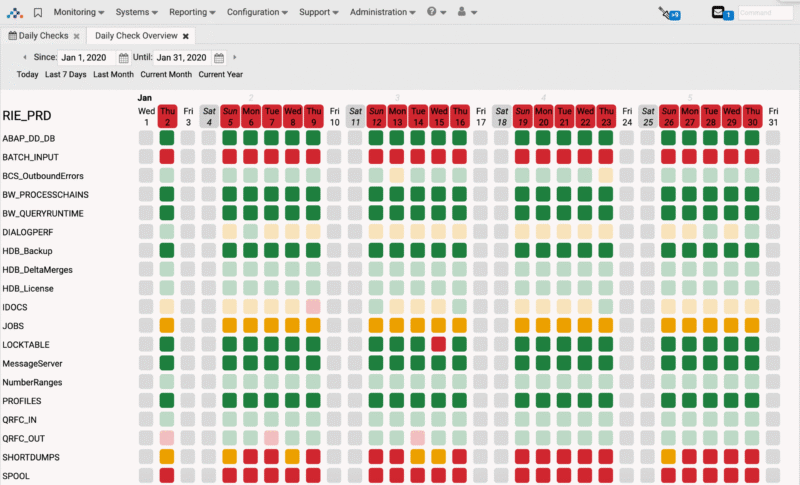
Some SAP conditions do not require real-time monitoring. You define which conditions need a daily check and when the results arrive. Daily checks include both native and custom checks, run against best-practice default thresholds or your own, and produce the report your team currently assembles by hand.
The morning check round is the single largest recurring manual task in most Basis teams. Automating it returns those hours and removes the variance between engineers, so the same conditions get checked to the same standard every day regardless of who is on shift.
|
Dimension |
Real-time monitoring |
Daily checks |
|---|---|---|
|
Frequency |
Continuous |
Scheduled at intervals you define |
|
Alert latency |
Seconds to minutes |
Next scheduled run |
|
Purpose |
Detect and escalate live incidents |
Verify state, produce evidence, spot trends |
|
Typical scope |
Availability, performance, interfaces, batch failures |
Capacity trends, backup verification, security settings, compliance evidence |
|
Output |
Alert to on-call engineer or ITSM ticket |
Report to the Basis team and service owners |
|
Replaces |
Reactive firefighting |
The manual morning check round |
|
Configurable thresholds |
Yes, per system and per check |
Yes, per system and per check |
Both modes run the same check library. The difference is cadence and response path, not coverage.
Related reading: the Basis engineer’s daily checklist and automated SAP reporting for SLA and performance reports.
Error-Free Onboarding
Add a new SAP system, and we’ll do the rest—automatically.
SAP landscapes are not static, especially when it comes to the dynamic nature of the cloud. But a constantly changing landscape should not require a lot of manual, error-prone monitoring configuration. Simply connect a new server—physical or virtual—and install the Avantra agent. Avantra will automatically identify the server, check for specific components—server, network, OS, SAP instances, HANA environments, databases, third-party apps and more—and apply the relevant monitors. Adding new systems is simple, fast, consistent, error-free—and automatic.
SAP Systems Monitoring Mobile App

SAP systems failures often happen in the least convenient times, when you are in your home office, or out for a walk. Using Avantra, you get a clear, meaningful notification to your phone via text. Even better you can monitor your SAP system using Avantra’s mobile app (available on Apple store and on Android) – where you can get full visibility to your SAP system landscape performance and health and even stop and start your SAP systems.
Frequently Asked Questions
What is SAP system monitoring automation?
SAP system monitoring automation is the scheduled, rule-based collection and evaluation of health data across every layer of an SAP system: operating system, database, application instances, business processes, interfaces, and security settings. Checks run automatically against defined thresholds and raise alerts without a Basis engineer executing each one by hand.
How much time does automated SAP monitoring save?
Avantra saves SAP teams at least 25 percent of the hours normally spent on daily system checks. The saving comes from three places: checks execute without manual initiation, results arrive pre-evaluated against thresholds, and new systems onboard automatically instead of through per-system configuration.
What is the difference between real-time monitoring and daily checks?
Real-time monitoring runs continuously and alerts within seconds or minutes of a threshold breach. Daily checks run on a schedule you define and produce a report covering conditions with no need for instant response. Use real-time monitoring for availability, performance, interfaces, and batch failures. Use daily checks for capacity trends, backup verification, security settings, and compliance evidence.
How many monitoring checks does Avantra include out of the box?
Avantra ships with more than 160 built-in best-practice checks covering the operating system, database, SAP application layer, business processes, and security. Native checks are included for SAP S/4HANA and SAP BusinessObjects. You add custom checks on top for site-specific conditions.
Does Avantra support custom monitoring checks?
Yes. Every SAP estate runs conditions no standard check covers, such as a threshold on a custom table, a bespoke interface queue, or a business-specific batch dependency. Avantra lets you define these as custom checks and run them alongside the built-in set, using the same thresholds, alerting, and reporting.
Avantra’s Automated SAP System Monitoring Can Put Your Mind at Ease
Get the info you need to decide if Avantra is right for your SAP landscape.
Real results. Across real landscapes.

“We needed better access to data about critical operations… our engineers were so busy reacting to day-to-day urgency, we had to outsource more strategic activities…”

“By using Avantra, we have been able to prevent serious failures in our SAP production systems. Today, we only need 1 to 2 hours to install server updates, we have been…”