

SAP Cloud ALM + Avantra
Cloud ALM for your SAP core. Avantra for everything it doesn’t reach.
Avantra brings Cloud ALM data into one view with the rest of your estate, covers the on-premise, hosted and non-SAP systems Cloud ALM can’t see, and automates the fix.
Trusted by 1,600 customers | 25+ years in SAP operations












Fewer outages, fewer false alarms, more time back
Up to 95%
Up to 70%
Up to 90%
A single day
Running SAP on RISE
RISE moved the infrastructure. The operational work stayed with you.
SAP runs the platform. Business process health, configuration, custom code and whether a job actually ran are still your team’s to manage. Cloud ALM helps with some of it, but it doesn’t reach the systems that aren’t moving to RISE at all.
Morning rounds that never end
Daily manual checks fill the gap between what a dashboard shows and what someone still has to go and do.
Two consoles, one estate
Cloud ALM shows the cloud core, other tools show the rest, and someone has to join the dots by hand.
Blind spots around RISE
The hosts, Web Dispatcher and identity tenant your service level depends on sit outside what you can see.
On-premise outages that stay quiet
Monitoring that runs inside a system can go quiet with it, so a stopped on-premise system needs a check from outside.
SAP support cases waiting on you
A case stuck in “customer action” in SAP for Me can sit unnoticed while the issue behind it keeps running.
Many customers, many consoles
Service providers checking a separate Cloud ALM instance per customer spend their time switching screens instead of fixing things.
How they work together
SAP Cloud ALM and Avantra: two platforms, one view of your SAP estate
What Cloud ALM brings
SAP Cloud ALM
Business process monitoring, project-to-run handover and BTP event automation in the SAP cloud core. Included with RISE and worth turning on.
Together
Cloud ALM data in Avantra
Cloud ALM’s health metrics run as Avantra checks on the systems you already monitor, so they reach the same teams, ServiceNow queues and automations as everything else.
What Avantra adds
Avantra
- On-premise, hosted and non-SAP systems
- RISE hosts, Web Dispatcher and identity tenant
- Automated fixes for known problems
- Every Cloud ALM tenant in one place
How it works
SAP Cloud ALM data, on the systems you already monitor
Connect Cloud ALM
Add each Cloud ALM tenant to Avantra with an SAP Cloud ALM API service key. Avantra only reads from Cloud ALM.
Map its systems to yours
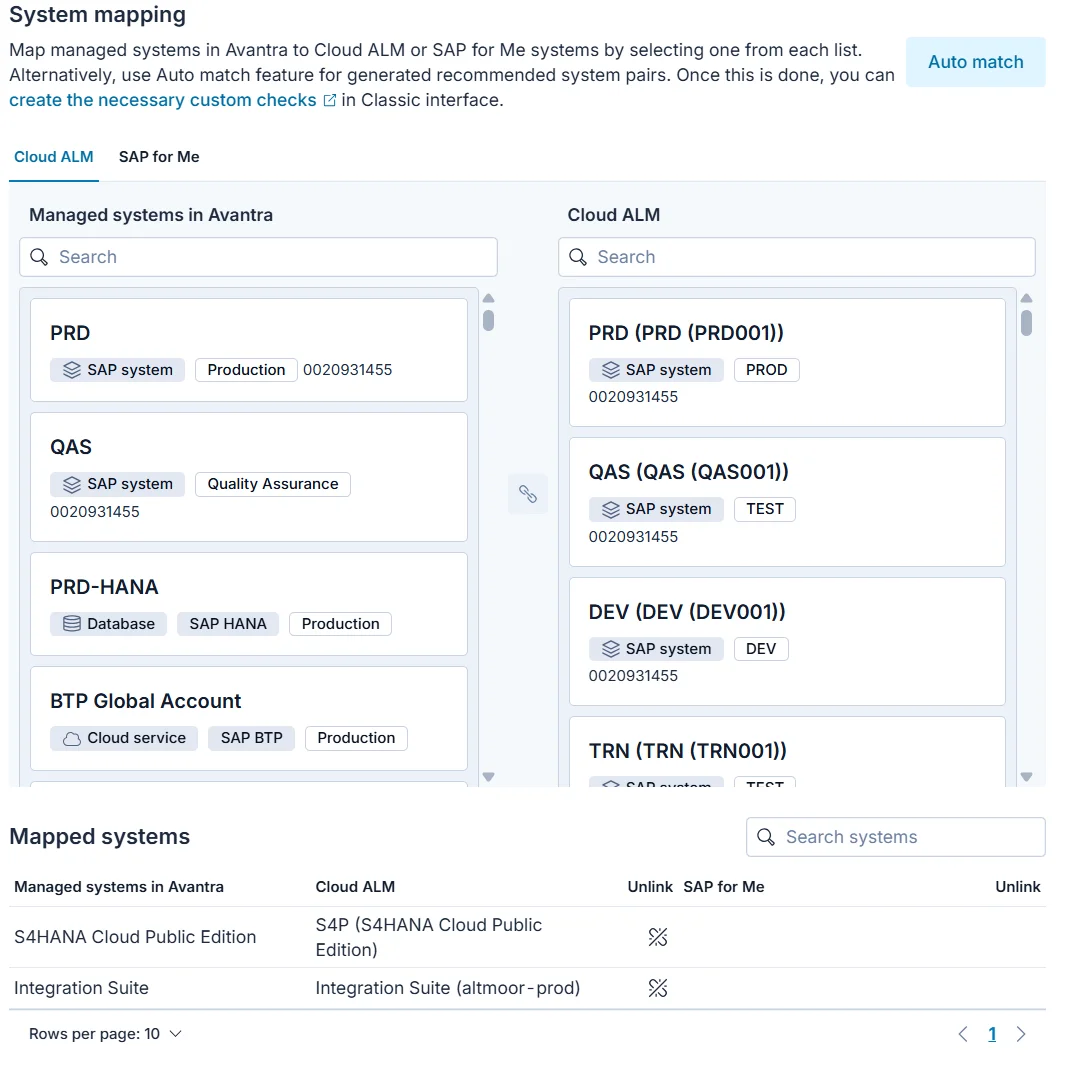
Cloud ALM systems are linked to the Avantra systems you already monitor. Auto match links SAP systems by SID, installation and system number, and you can map the rest by hand.
Add Cloud ALM metrics as checks
Pick any Cloud ALM health monitoring metric for a mapped system and it becomes an Avantra check, with Cloud ALM’s thresholds or your own.
Seven ways Avantra extends SAP Cloud ALM
System mapping
Map systems across Avantra and Cloud ALM
Avantra lists Cloud ALM’s systems next to the ones it already monitors, ranks the likely matches and maps exact matches in one click.
- One view of each system across Avantra, Cloud ALM and SAP for Me, with a link to SAP for Me.
- Mapping follows your customer hierarchy.
Cloud ALM data
Turn Cloud ALM metrics into checks you can act on
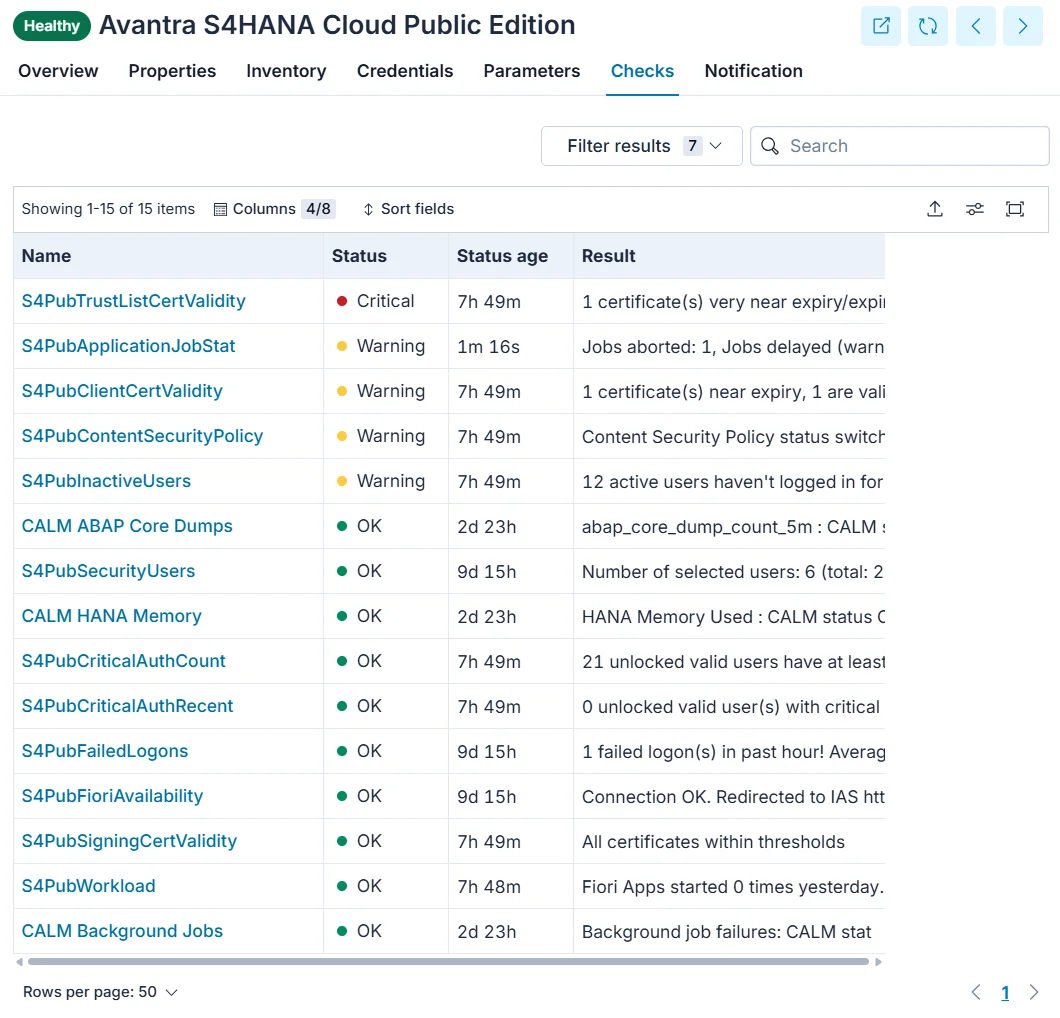
Choose the Cloud ALM health monitoring metrics that matter for each mapped system and they run as native Avantra checks, next to the checks Avantra already runs on that system.
- Use Cloud ALM’s own thresholds, or set your own per system.
- Run as real-time checks, daily checks or both.
- Open, update and close ServiceNow incidents as the check changes.
- Start an automation or workflow from the alert.
- Keep an eye on the tenant itself: API calls, outgoing data volume and memory against SAP’s limits.
SAP for Me and ITSM
Never miss an SAP case that's waiting on you
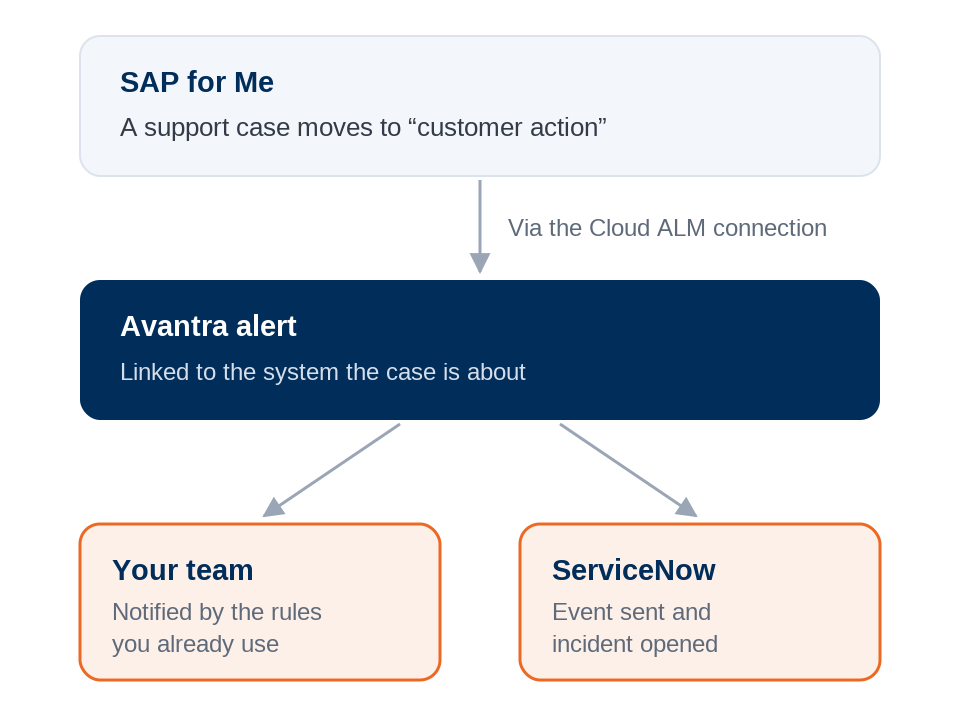
Through the Cloud ALM connection, Avantra alerts when an SAP for Me support case or service request for one of your systems needs action from your team.
- Cases and service requests in “customer action”, linked to the system they’re about.
- Filter by SAP component, and catch cases for systems you haven’t mapped yet.
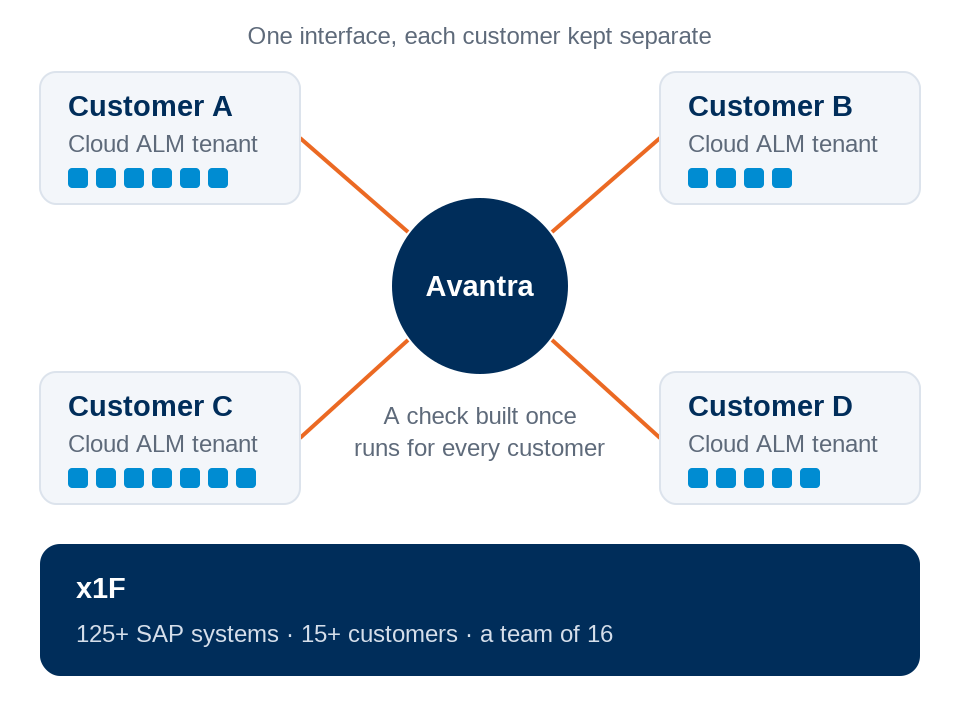
For managed service providers
Every customer's Cloud ALM, in one place
Service providers and large enterprises often run more than one Cloud ALM tenant. Avantra brings them all into one interface, organized by your customer hierarchy.
- Connect as many Cloud ALM tenants as you run, each with its own credentials.
- Customer separation built in, for permissions, notifications and reports.
- Build a check once and apply it the same way across every customer.
Independent availability
Know an on-premise system is down, even when it can't tell you
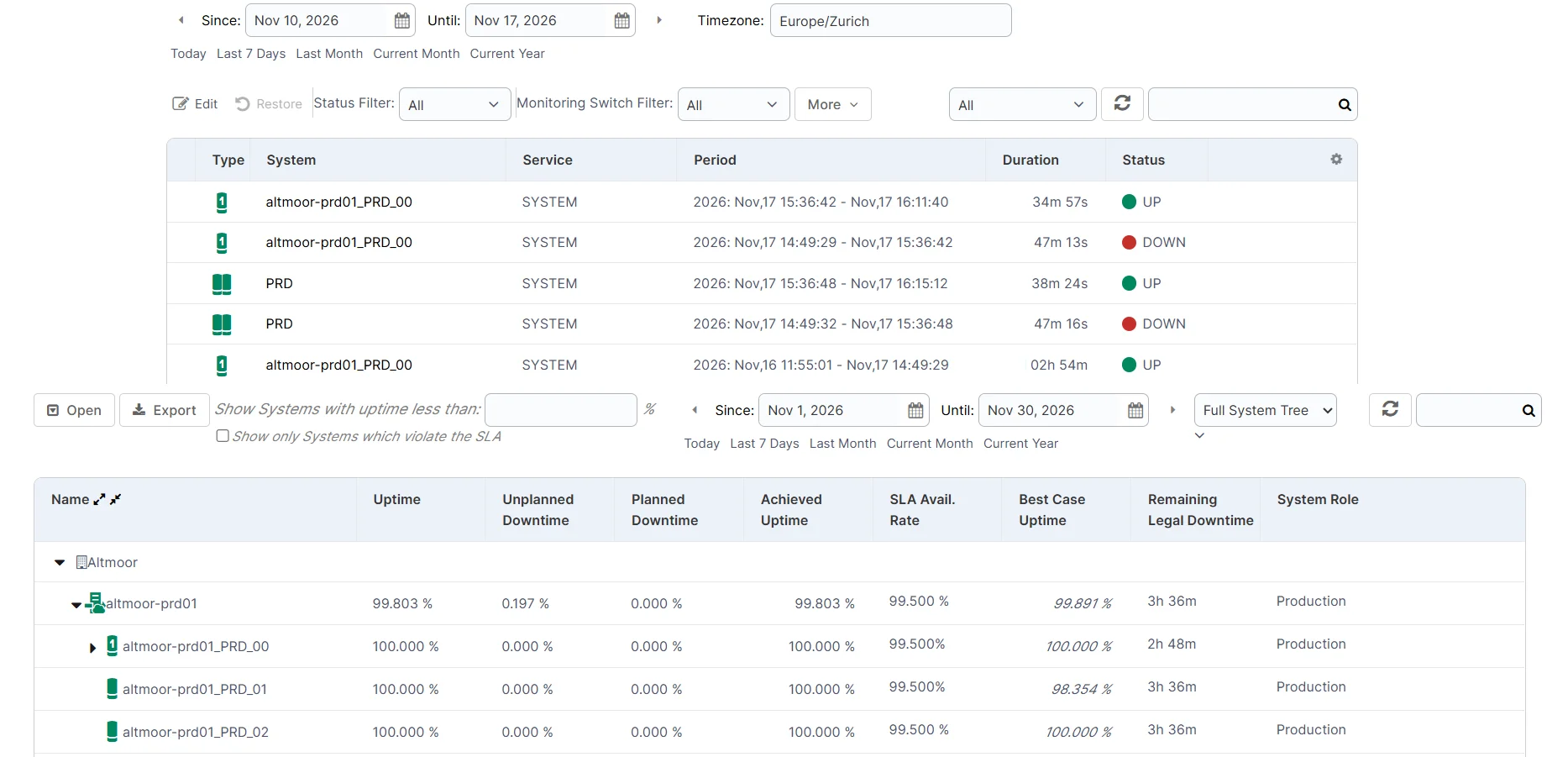
Avantra detects outages independently of the system it watches, so a stopped system raises an alert instead of simply going quiet. That’s the difference between a routine fix and an outage your users report first.
- Availability checks run from outside the system, so silence is treated as a signal.
- Service level reports built on outages Avantra detected, not ones typed in by hand.
New in Avantra
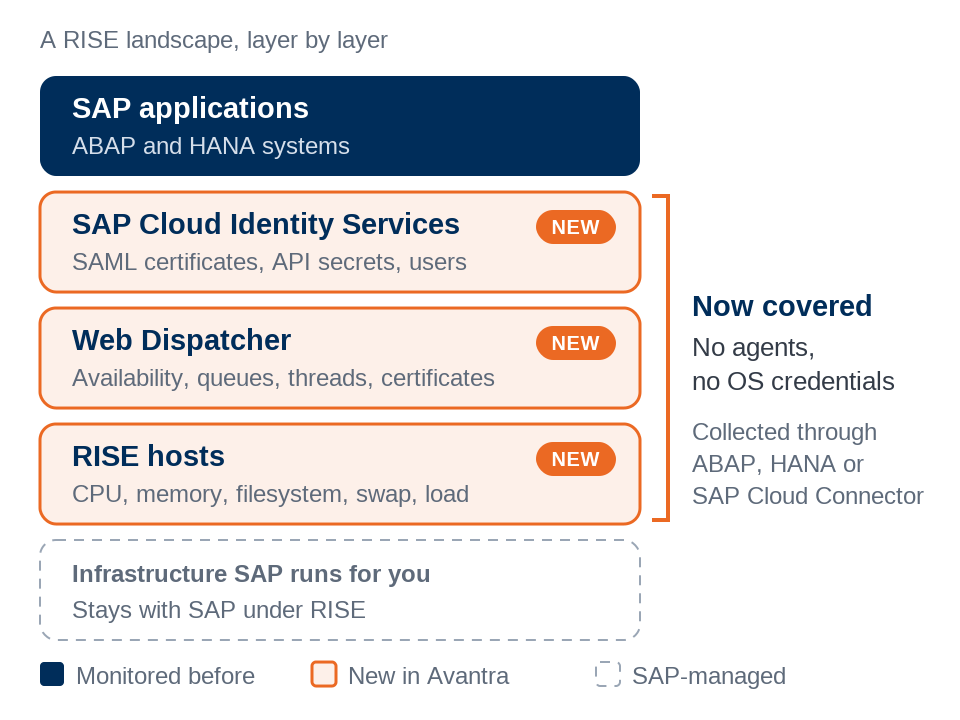
See the parts of RISE that sit just outside your tooling
Some of what your service level depends on in RISE was never inside your monitoring scope. Avantra now covers it without agents, through the SAP components already running and SAP’s public APIs.
- RISE host CPU, memory, filesystem, swap and load, collected through ABAP, HANA or SAP Cloud Connector. Nothing to install, no OS credentials.
- Web Dispatcher availability, connection, queue and worker thread usage, plus daily certificate checks.
- SAP Cloud Identity Services: SAML certificate and API secret expiry, weak digest algorithms and dormant users.
- The same checks, thresholds and service level reports you already run everywhere else.
Automation, not just alerting
Fix known problems before anyone gets paged
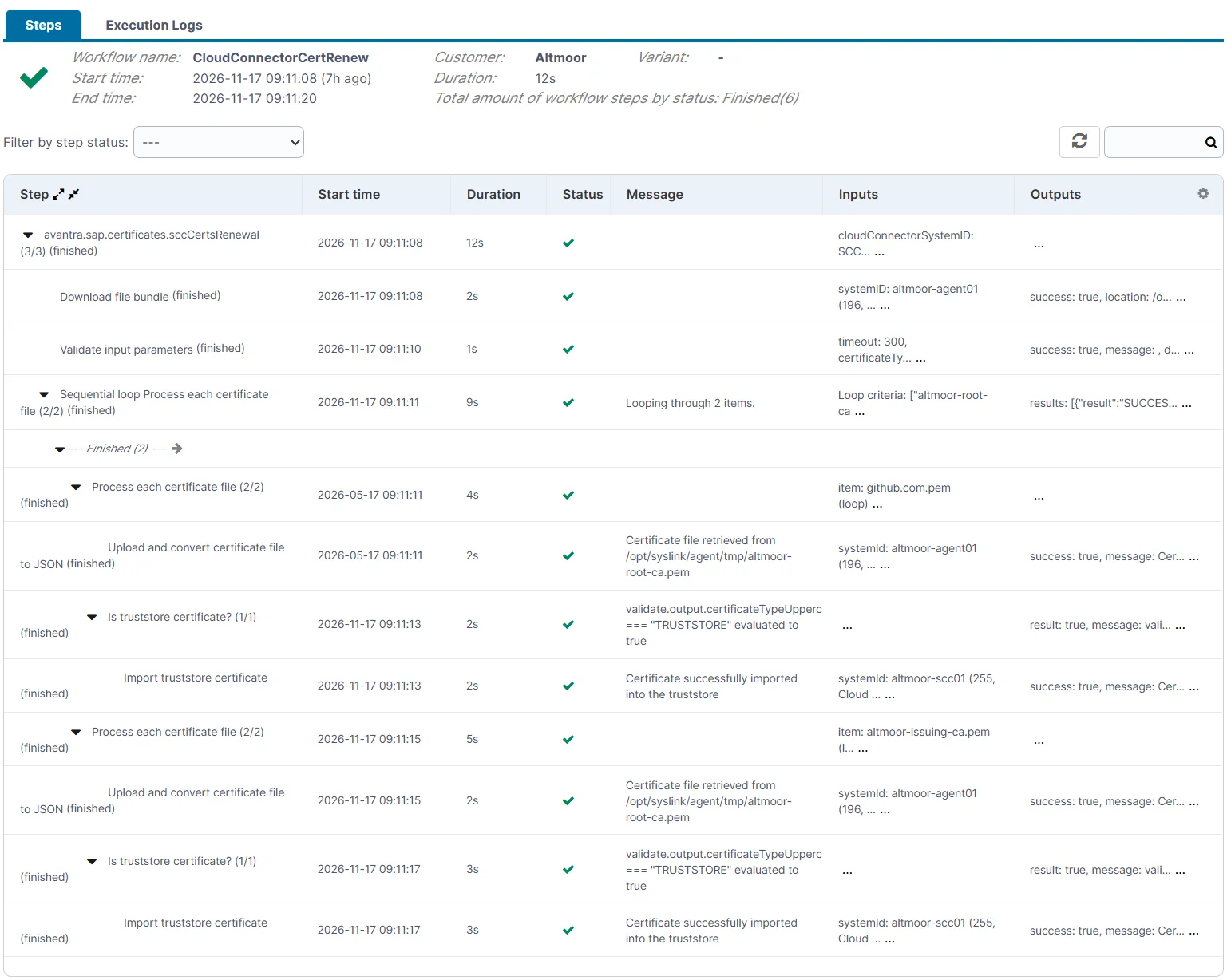
When the cause is known, Avantra can run the fix itself through automations your team has reviewed and switched on. Renew a certificate before it expires, or shut down an idle cloud service that’s quietly burning budget.
- Deterministic automations your team controls, with every run logged.
- Continuous automated checks replace the daily manual rounds.
- Build a check once and roll it out across every system and client.
- The same automations run on ECC, S/4HANA, RISE-retained and BTP systems while you adopt Cloud ALM.
- System refresh keeps each system’s Cloud ALM connection and data collection settings in place.
Move from SAP Solution Manager to SAP Cloud ALM without losing automation
Mainstream maintenance for Solution Manager ends in 2027, and many ECC and S/4HANA teams are planning their move to Cloud ALM. Avantra keeps monitoring, automation and central control running across the whole estate while you adopt Cloud ALM at your own pace.
What deployment looks like
Typical deployment takes a single day, and Cloud ALM keeps doing its job the whole time. Avantra runs in your own environment, and your team decides when it changes.
Day 1
Onboard your systems
Install the Avantra agent on on-premise and hosted systems in about five minutes each, then connect and configure.
Connect Cloud ALM
Add each Cloud ALM tenant with an API service key, then auto-match its systems to yours.
Add the RISE layers
RISE hosts are discovered from the systems Avantra already monitors. Add the Web Dispatcher and identity tenant with an admin URL or API credential.
Switch on checks
Start with 300+ out-of-the-box checks and the Cloud ALM metrics you choose, then build custom checks once and apply them across systems and clients.
Week 1 onward
Automate and report
Turn on the automations your team has reviewed, and define SLAs and service level reports for multiple systems in minutes.
Real results
Real results across real landscapes.

Case study
x1F moves beyond monitoring to end-to-end SAP automation
With a team of 16 serving 15+ customers, x1F eliminated daily manual checks across 20 to 30 transactions per system and cut new system onboarding from hours to minutes. Avantra let x1F grow its managed services team and customer base without increasing risk.

Case study
Absoft moves from reactive maintenance to self-healing SAP operations
The SAP on Azure MSP automates daily, best-practice, and real-time system checks with Avantra. Business process dashboards give end-to-end visibility across hybrid landscapes, and custom checks let Absoft design tailored automation for every customer.

Case study
Global SAP Observability, Zero Disruption: SEW-EURODRIVE’s Journey to Industry 4.0 Excellence
See how SEW-EURODRIVE scales IT service management across 130+ SAP systems with Avantra in an Industry 4.0 production setting.
FAQ
Frequently asked questions
Does Avantra replace SAP Cloud ALM?
No. Cloud ALM comes with RISE and stays your SAP backbone. Avantra reads its data and adds the operations and automation layer for the systems it doesn’t reach.
How does the Cloud ALM integration work?
You add Cloud ALM to Avantra as a cloud service. Its systems are mapped to the Avantra systems you already monitor, and you can then add Cloud ALM health metrics to those systems as Avantra checks, alerts and dashboards. How it works.
What Cloud ALM data does Avantra use?
Health monitoring metrics, which run as Avantra checks on mapped systems; SAP for Me support cases and service requests waiting on customer action; and the tenant’s own usage against SAP’s limits.
Does Avantra extend SAP Cloud ALM for SAP BTP monitoring?
Yes. Add a BTP global account and Avantra discovers everything beneath it: subaccounts, Cloud Foundry applications, and supported services such as Integration Suite, Event Mesh, Job Scheduling and SAP AI Core. BTP systems that Cloud ALM also monitors can be mapped to it, so Cloud ALM’s health metrics run as Avantra checks next to Avantra’s own, in the same view as S/4HANA and ECC.
Can Avantra manage multiple Cloud ALM tenants simultaneously?
Yes. Avantra brings every Cloud ALM tenant into one interface, with reporting, configuration and automation organized by customer. It’s built for service providers and enterprises that run more than one tenant.
We're fully on RISE. Do we still need Avantra?
RISE covers the infrastructure, but the service level for your business processes, jobs, custom code and interfaces is still yours. Avantra automates the fixes for known problems before they become tickets, and monitors RISE hosts, the Web Dispatcher and your identity tenant.
How do Solution Manager, Cloud ALM and Avantra compare?
Solution Manager is SAP’s on-premise ALM tool for ECC and S/4HANA, with mainstream maintenance ending in 2027. Cloud ALM is its cloud-based successor, included with RISE and SAP Enterprise Support. Avantra works alongside either, giving estates one approach to observability, automation and security, anywhere SAP runs. Read the full SAP Cloud ALM vs Solution Manager comparison.
Does Avantra send data back to Cloud ALM?
No. Avantra only reads from Cloud ALM’s APIs; it doesn’t write to your tenant. A daily check tracks API calls and data volume against SAP’s limits.
What types of SAP systems does Avantra support?
Avantra monitors ABAP systems on SAP Basis releases from 4.6C through 7.7x, which covers ECC and S/4HANA wherever they run: on-premise, hosted or in RISE with SAP. It also covers SAP BTP, SAP BusinessObjects, and the databases and servers underneath, plus SAP cloud services: S/4HANA Cloud Public Edition, Cloud ALM, Cloud Integration, Cloud Connector, Cloud Identity Services, Analytics Cloud and Datasphere.