

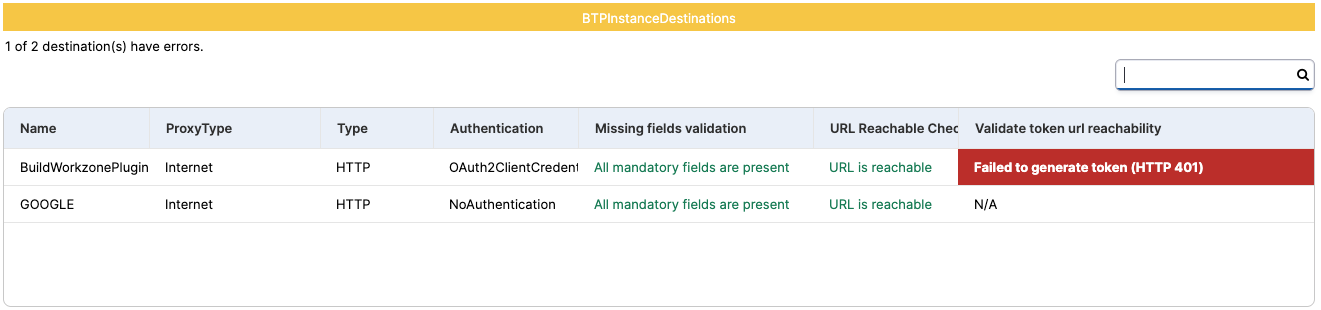
A failed SAP BTP destination check is rarely about the destination record alone. Missing settings, an unreachable URL, a rotated OAuth secret or an expired certificate can each break a destination that worked yesterday. Testing every destination on a schedule, and tracking the certificates behind them, finds these problems before the applications that depend on them do.
What are destinations and why do they matter for operations?
Destinations in SAP Business Technology Platform (SAP BTP) are the address book of every extension, integration and app built with SAP Build. They hold the URL, authentication, credentials and proxy type, and live at subaccount level or inside a Destination service instance.
One detail matters more than it looks: an instance destination takes priority over a subaccount destination of the same name, so fixing the subaccount copy does nothing for an application bound to the instance.
For operations, that indirection cuts both ways: nobody hard-codes an endpoint, but when a destination breaks, the error surfaces several layers away.
What does a failed SAP BTP destination check usually mean?
Most failures appear during normal operations, on destinations that worked for months. The record has not changed; something it depends on has.
- The target stopped answering. A maintenance window, a hostname retired after a migration, a changed firewall or proxy rule, or an expired server certificate on the target. An internet destination shows none of this until an application calls it.
- The token request started failing. OAuth destinations obtain tokens from a token service and cache them until they expire, so a failure can surface hours after the cause. A client secret expires or is rotated, a scope is withdrawn, the token service is unavailable, or a certificate used for the request lapses. The destination looks the same; the token service now says no.
- Credentials behind the destination changed. A technical user is locked or expired, a password policy forced a change, or a backend authorization was removed; the destination fails at the next call.
- Settings that were never complete. The one configuration-time cause: a copied destination missing its token service URL, or a blank client ID, saves normally and fails on first use.
Check Connection in the SAP BTP cockpit only tests that the URL is reachable; any status below 500, even a 401, counts as success. Nobody clicks it after a secret rotation, a maintenance window or a certificate renewal on the other side. A scheduled test of every destination, including a real token request, adds that runtime layer.
What happens when a destination or SAML trust certificate expires?
The connection stops working on a date that was known well in advance.
Destinations that use client certificate authentication, or keystores for token requests, carry uploaded certificates with expiry dates nobody sees in daily work. Cloud Integration keystores carry the same risk.
The subaccount also holds a destination trust, whose SAML2 metadata certificate signs the assertions used for principal propagation and SAML bearer flows. Target systems such as SAP S/4HANA Cloud or SAP SuccessFactors trust that certificate. When it expires, or is rotated without updating them, SAML bearer destinations stop propagating users and every application relying on them fails at once.
How do you move destinations between landscapes safely?
Treat promotion from development to production as a repeatable copy with explicit URL changes, never as a manual retyping exercise.
Each landscape has its own backend URLs, token service URLs, keystores and secrets. Editing each URL by hand is slow and easy to get half right, and the usual result is a production destination that still points at a development backend until someone looks closely at the data.
What happens when Cloud Connector is the weak link?
Every on-premises destination depends on SAP Cloud Connector, so a correct destination covers only half the path. If the connector is stopped, disconnected from the subaccount or holding an expired certificate, those destinations fail together, and each application reports its own error. Memory pressure shows up as timeouts, which sends troubleshooting toward the wrong component. Our earlier post on SAP Cloud Connector for ground-to-cloud and AI operations covers its operation in depth.
How does Avantra help with SAP BTP destinations?
Avantra tests destinations the way applications use them, on a schedule, and reports the cause rather than the symptom. It discovers the global account and its subaccounts, and treats destinations as part of one observability and automation platform for the whole SAP estate.
- Every destination tested. Subaccount and instance destinations are checked for the mandatory settings of their type and authentication method, internet URLs are tested for reachability, and OAuth destinations request a token from their token service with the stored client credentials. Failing destinations raise alerts at configurable thresholds, and each test can be switched to report-only.
- Certificates warned in advance. Destination certificates and the SAML2 trust metadata certificate are tracked against their expiry dates, with warning and critical windows you choose.
- The bridge watched too. On-premises destinations are covered through Cloud Connector monitoring: health, connected subaccounts, connections, certificates and memory. Updates can be automated, including zero-downtime updates of a high-availability pair.
- Promotion without retyping. A guided automation copies instance destinations between two Destination service instances, lets you exclude any from a live list, and rewrites URLs with patterns applied in sequence. Creating the service instances themselves is a separate provisioning task.
The Avantra documentation for SAP BTP lists the prerequisites.
Frequently asked questions
Why does a destination pass Check Connection but fail at runtime?
Check Connection in the SAP BTP cockpit is a one-off reachability test of the URL, not of credentials or tokens. Flows that need a logged-on user’s token are exercised only at runtime, and nobody reruns the test when a secret or token service URL changes. Testing destinations on a schedule adds that runtime view.
What happens when the SAML trust certificate expires?
The SAML2 metadata certificate behind a subaccount’s destination trust signs the assertions that let user identity flow to target systems. When it expires, OAuth2SAMLBearerAssertion and SAMLAssertion destinations stop propagating the user, usually for every application that relies on them at once. A warning several weeks ahead makes the rotation a planned change instead of an outage.
Can destinations be migrated with changed URLs?
Yes. Avantra can copy instance destinations from one SAP BTP Destination service instance to another, for example from development to production, rewriting each URL with search and replace patterns applied in sequence. Destinations that already exist on the target are left untouched and reported, and a single failure does not stop the run.
How does Cloud Connector relate to destinations?
A destination with an on-premises proxy type does not reach the backend directly. It routes through SAP Cloud Connector, which exposes the internal system under a virtual host. If the Cloud Connector is down, disconnected from the subaccount or holding an expired certificate, every on-premises destination behind it fails, however correct the destination itself is.
The 401 that reaches the help desk on Monday usually started with a secret rotated on Friday. A scheduled token request reports it on Friday instead.