

SAP Cloud Integration monitoring works best when it looks beyond the failed message list. Confirm that every artifact is deployed and started, compare failures and processing times with each flow’s own history, and track the keyStore, JMS broker, data stores and variables. Those signals usually change well before an iFlow stops a business process.
What is Cloud Integration and why does it matter for operations?
SAP Integration Suite, Cloud Integration capability is the runtime on SAP Business Technology Platform (SAP BTP) where integration flows connect SAP S/4HANA, SAP SuccessFactors, banks, tax authorities and trading partners. In many organizations it has become one of the busiest middleware platforms in the estate, owned by one team and depended on by every line of business.
That dependency is the operational problem. When an iFlow fails, nothing visibly crashes. Invoices do not reach a partner, a payroll file arrives late, or orders sit in a queue. Often treasury reports it first, asking where the morning bank statement went, by which point the backlog is a day old.
Are your integration flows actually deployed and healthy?
A successful deployment and a started artifact are two different things. An integration flow can be deployed and still sit in an error state at runtime until someone checks its runtime status. Typical causes are an adapter setting that does not resolve, an endpoint address already claimed by another flow, or a value mapping or script collection that failed to deploy.
The useful view is one row per integration package with its count of artifacts in error and the runtime error message one click away. One artifact in error deserves a look; several in one package usually means a shared dependency has broken.
How do you spot failure spikes and slowdowns before users do?
Compare each flow with its own recent baseline, not a fixed number. Ten failures a day is noise for a high-volume order flow and an emergency for a monthly bank statement flow, so absolute thresholds either miss real problems or alert constantly.
For each artifact, a baseline comparison asks:
- Have failed messages risen sharply against the average of recent periods?
- Have completed messages dropped, perhaps because a sender stopped calling?
- Has average processing time increased, often a precursor to timeouts?
Status matters too. Retry, escalated and abandoned messages point to different fixes, and a flow that retries heavily also consumes message volume, which has a cost. Where flows are exposed through API proxies, the same trend thinking applies to the proxy layer.
Which Cloud Integration failures raise no error until it is too late?
Keystore certificates, the JMS broker, data stores and variables raise nothing until the day they raise dozens, yet each has a date or a limit attached.
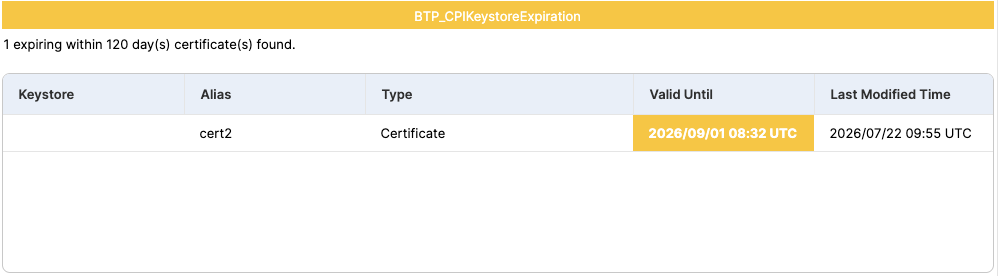
Key pairs and partner certificates in the tenant keystore expire on a fixed date. When one does, every flow that signs, encrypts or authenticates with it fails together. The same discipline applies to certificates elsewhere on SAP BTP, destinations included.
Asynchronous flows depend on a JMS broker with finite capacity, transacted sessions, producers and consumers. Queues in a warning or error state, or a broker near its maximum, mean asynchronous processing is close to its capacity limits. Teams running SAP Event Mesh face a similar risk with their queues.
Data stores and variables fail more slowly. An overdue data store entry is a message a flow was meant to collect and did not. A variable nearing its retention end has not been written for a long time; once it is deleted, flows that read it may misbehave.
How does Avantra help with SAP Cloud Integration monitoring?
Naturally, this Avantra blog is going to recommend watching every Cloud Integration tenant from the same place as the systems it connects. Once a tenant is connected to Avantra (a one-time setup in its subaccount), it is monitored alongside SAP S/4HANA, SAP HANA and SAP Cloud Connector in one console for observability and automation.
- Know which package is broken: artifacts in error per package with the runtime error message, escalating as more fail.
- See which flows fail or retry: counts per package and artifact by status over a look-back window you choose, with optional thresholds.
- Catch a slowdown before the timeout: failed and completed counts and processing time against the average of several previous windows of the same size (days, hours or minutes), so a change stands out early.
- Keep design quality visible: the latest result against SAP’s integration design guidelines per artifact, with violations by category, and optionally a fresh guideline evaluation, at most once a day per artifact.
- Get warned while there is time to act: keystore certificates flagged well before expiry, JMS queue and broker health, overdue data store entries and variables nearing retention end.
Comparing each flow with its own history keeps noise down, because a change stands out against that flow’s normal rather than a fixed number, and a result that needs action can open a service desk ticket or start an Avantra automation. The Avantra documentation for SAP BTP lists the prerequisites.
Frequently asked questions
Which Cloud Integration signals show trouble early?
The earliest signals are deployed artifacts in an error state, failed or retry counts rising against a flow’s own history, longer processing times, certificates nearing expiry, JMS queues or broker capacity in a warning state, and overdue data store entries. Each usually changes before business users notice missing documents.
How do I know a deployed iFlow is in error?
Check the runtime status of every deployed artifact, not only the deployment action. A flow can deploy successfully and still fail to start, for example because of an invalid adapter setting. Monitoring each package for artifacts in error, with the runtime error message, shows the problem before the first sender times out.
What happens when a keystore certificate expires?
Every integration flow that uses the expired key pair or certificate for signing, encryption or client authentication fails its connections, often across several partners at once. The fix is simple but the outage is not, so Cloud Integration keystore expiry dates should carry warnings weeks or months ahead.
Doesn’t SAP already monitor Cloud Integration?
Yes. Cloud Integration has its own monitors, and SAP Cloud ALM and SAP Alert Notification service for SAP BTP add alerting and operations views. Avantra complements them by bringing the same signals together with the rest of the SAP estate, including systems outside SAP BTP, adding trends, history, notifications and automation in one place.
Some integration failures are sudden, such as a partner endpoint going offline. Many more, such as an expiring key pair, a filling broker or a drifting baseline, give days of warning to anyone watching.