

SAP Cloud Connector plays a central role.
Cloud connectivity for classic ERP
The Cloud Connector runs on-premise, securely connecting to BTP for integration tasks. Cloud applications including Integration Suite flows, Joule skills and BTP-hosted extensions route their requests through the tunnel to specifically allowed on-premises systems. No inbound firewall openings. No DMZ jump hosts. No exposed RFC or HTTP endpoints sitting on the internet.
It also handles principal propagation: a user authenticated in the cloud is projected into the backend with their actual SAP identity, so backend authorizations are enforced the way they always have been. That single capability helps keep audit and security teams comfortable with adopting hybrid architectures.
For large SAP customers with an indefinite timeline for hybrid operations, the Cloud Connector makes integration and operations safe, practical and becomes a gateway for traditional integrations between legacy systems migrating to the cloud and new Agentic ERP running across any system in the SAP estate.
Vintage vantage points
Cloud connector operations have some standout categories for proactive management. Monitoring and managing these key items helps ensure integration availability and protect the business from unexpected outages.
| Requirement | Rationale |
| Certificates | By default the SCC ships with a self-signed UI certificate that’s fine for a lab but inadequate for production. Replacing it with a CA-issued certificate is straightforward, but teams often forget to monitor for expiration.
Additionally certificates are used for principal propagation into backends—those expire too, and when they do, single sign-on through the connector stops working in confusing ways. |
| Enforced updates | SAP supports the latest two feature versions of Cloud Connector in parallel per SAP Note 3302250.
SAP recommends upgrading patch levels within 3 months of release and generally supports 2 feature versions in parallel, so support is typically limited to the current release and the one immediately preceding it. Once the next feature release is provided a transition phase of 4 months supports the most recent 3 versions. Upgrades to the latest feature release are supported from the previous 2 feature releases and the same is true for restoring backups created by older releases. There’s no LTS option and no calendar-based extension. If your operations team treats Cloud Connector as a set-and-forget component, you will eventually fall outside the support window and run cloud connector at your own risk. |
| High availability | High availability hybrid landscapes run Cloud Connector in a master/shadow pair. Configuring HA isn’t difficult, but testing the failover regularly, keeping the shadow’s certificates in sync with the master, and making sure alerts actually fire on takeover are tasks eas to neglect.
The danger is that SCC failures cascade. A failure in the Cloud Connector is a failure across every cloud-to-ground integration, every Joule skill dependency on the backend, and every BTP extension reading on-prem data. |
| Backup | The Cloud Connector holds substantial configuration: connected sub accounts, exposed systems, virtual hosts, principal propagation settings, system certificates, audit log configuration, allow-listed resources, and the role assignments granting access to all of it.
Rebuilding that from scratch in non-trivial. SAP provides a set of instructions for performing and restoring backups, but they aren’t automated. It depends on a human remembering to do it after every change, and most enterprise SAP-aware backup tooling doesn’t recognize Cloud Connector as a first-class workload. Most major SAP backup vendors targeting SAP don’t provide a specific indication for Cloud Connector. Filesystem snapshots of the install directory should technically capture it, but they aren’t version-aware and they aren’t tested as a restore path. |
Supporting agentic ERP
SAP’s stated direction is “AI first, then migrate.” Joule Studio reference architectures, agent patterns and the SAP Build Actions tooling all assume the same thing: when a Joule agent needs to read or write data that lives in on-premises ECC, S/4HANA, or a custom system, it does so through Cloud Connector.
SAP’s own guidance for accessing on-premises HTTP and RFC endpoints from Joule Studio walks customers through configuring an SCC instance, exposing the backend resource, and creating a destination on the BTP side. The agent talks to BTP; BTP talks to SCC; SCC talks to your ECC or S/4HANA box. No tunnel, no agent.
This is the “benefit now, plan for later” path. Customers who aren’t ready to lift their core ERP to Cloud ERP can still light up AI agents against the systems they already have, provided the Cloud Connector layer is solid. The migration story doesn’t have to come first, Cloud Connector does, and with it a need for comprehensive operations management.
Confidence in cloud connectivity
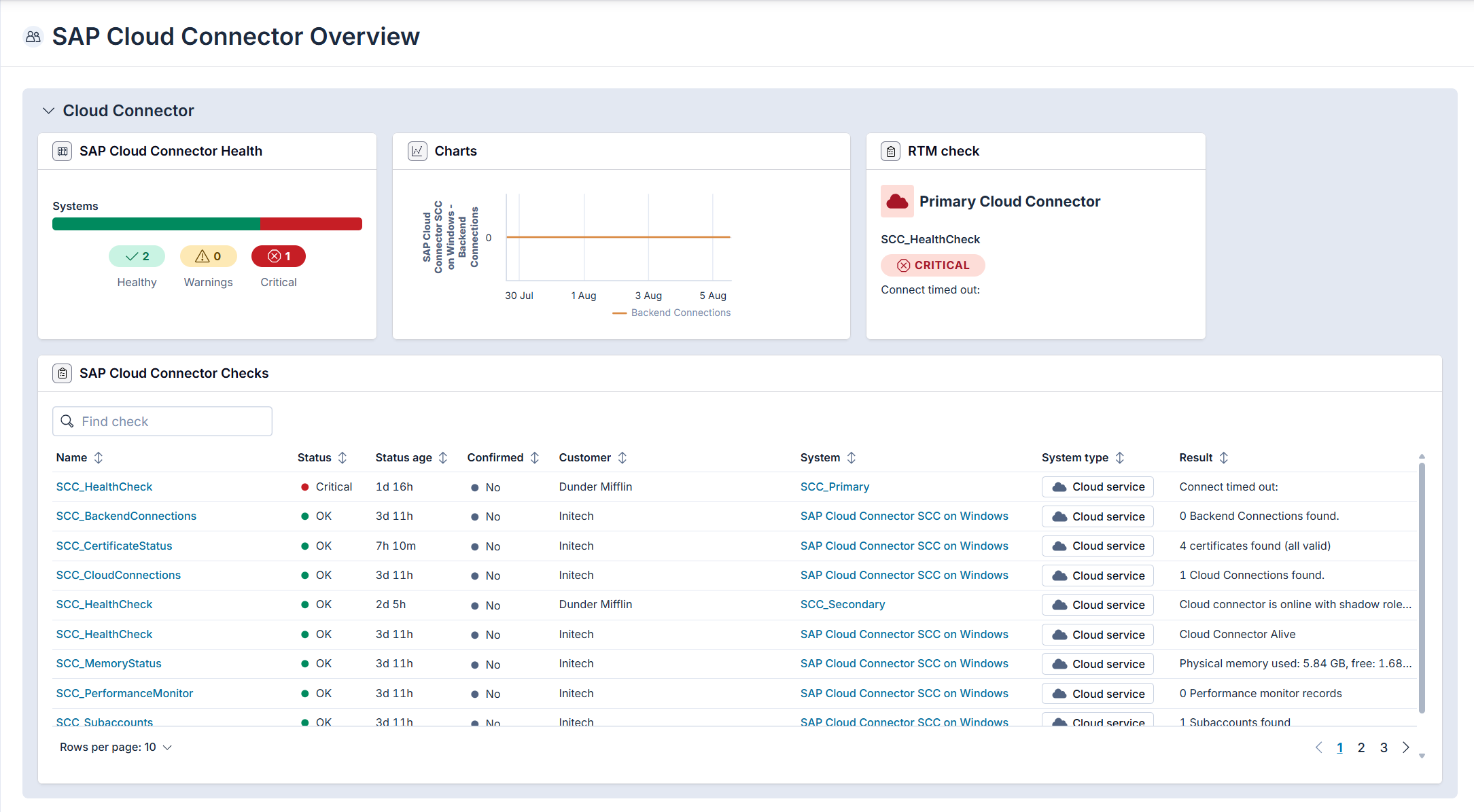
Avantra has been monitoring Cloud Connector through SAP’s SCC monitoring API since the 20.11 release, and the coverage has deepened across every major version since. Built-in checks today include:
| Check | Impact |
| SCC_HealthCheck | Monitor the core connector for uptime and availability |
| SCC_CertificateStatus | Monitor all certificates for expiration dates and impact to operations |
| SCC_BackendConnections | The full list of backend systems and detailed information for each including connection state |
| SCC_CloudConnections | Monitors open connections for service channels and provide information for any open connections |
| SCC_Subaccounts | Every subaccount currently connected to the SCC |
| SCC_MemoryStatus | Monitors the memory usage of the Cloud Connector with physical, virtual, and heap memory, with separate thresholds for each |
| SCC_PerformanceMonitor | Performance data straight out of the SCC performance monitor, with global and per-resource thresholds |
| SCC_TopTimeConsumers | Displays the top time consumers provided by the Cloud Connector performance monitor – excellent for monitoring activity levels |
These run as built-in checks alongside everything else Avantra manages including ECC, S/4HANA, HANA, Basis, BTP subaccounts giving Cloud Connector peer status within the same single pane of glass as the rest of the SAP estate.
Avantra has extended automation for Cloud Connector significantly. The Cloud Connector automation add-in covers operational lifecycle tasks historically relegated to manual activities:
- Install and upgrade, including the twelve-month enforced-update cadence
- Start and stop, scriptable into change windows and dependency-aware workflows
- Master/shadow HA takeover
- Configuration backup
Avantra provides a single solution to monitor SCC, alerts on certificate expiry, and orchestrate failover, in addition to comprehensive automation across all landscapes and AI root cause analysis and observability across the entire SAP estate – anywhere it runs.
Foundation first, then everything!
SAP’s framing for the next several years is consistent: get to AI, then migrate; integrate where the data lives now; benefit now, plan for later. That’s not just marketing. It’s also an accurate read of where most large SAP customers are today: running ECC and S/4HANA side by side, on-premises and Cloud ERP landscapes concurrently, integrating with SaaS apps that aren’t moving anywhere, and starting to experiment with Joule and the Business AI Platform without having finished a Cloud ERP migration.
For those customers, Cloud Connector keeps the strategy coherent. Monitor it like the critical infrastructure it is.
For a walkthrough of Avantra’s built-in Cloud Connector checks and the Cloud Connector automation add-in, explore our Platform pages or get in touch with one of our SAP experts for a customized demo and conversation.