

SAP API Management monitoring should show which proxies are returning errors and on which calls, whether traffic or response times have shifted against recent history, and which certificates are close to expiry. Add an inventory of API products and their consumers, and you know both what is failing and who it affects.
What is API Management and why does it matter for operations?
SAP Integration Suite, API Management capability is the gateway on SAP Business Technology Platform (SAP BTP) in front of SAP and non-SAP services. Proxies apply security and traffic policies, the API portal holds the design time, and the Developer Hub (formerly API business hub enterprise) lets developers discover products and register applications against them.
Operationally, API Management sits on the critical path of mobile apps, partner portals and system-to-system calls. When a call fails at the gateway, the consumer sees an error and the back-end team sees nothing, because the request never reached them. That puts the gateway team first in line for every complaint, which is a strong argument for knowing about problems before the complaints arrive.
Which proxies are failing, and on which calls?
Count error responses per proxy over a defined period, then list the individual failing calls. A per-proxy count shows where to look; the call detail shows what to fix.
Here, an error is any HTTP response in the 4xx or 5xx range. A useful failing-call view shows the proxy and request URL, the response code, how often it occurred and when, and a timing breakdown that separates gateway latency from back-end time.
That breakdown decides who gets the ticket. A slow target response points at the service behind the proxy, while high processing latency points at policies in the gateway. Include and exclude lists keep known noise, such as a test proxy that deliberately returns errors, out of the alert. Where the back end is an integration flow, the next step is usually monitoring SAP Cloud Integration before iFlows fail.
How do you spot traffic and latency shifts against history?
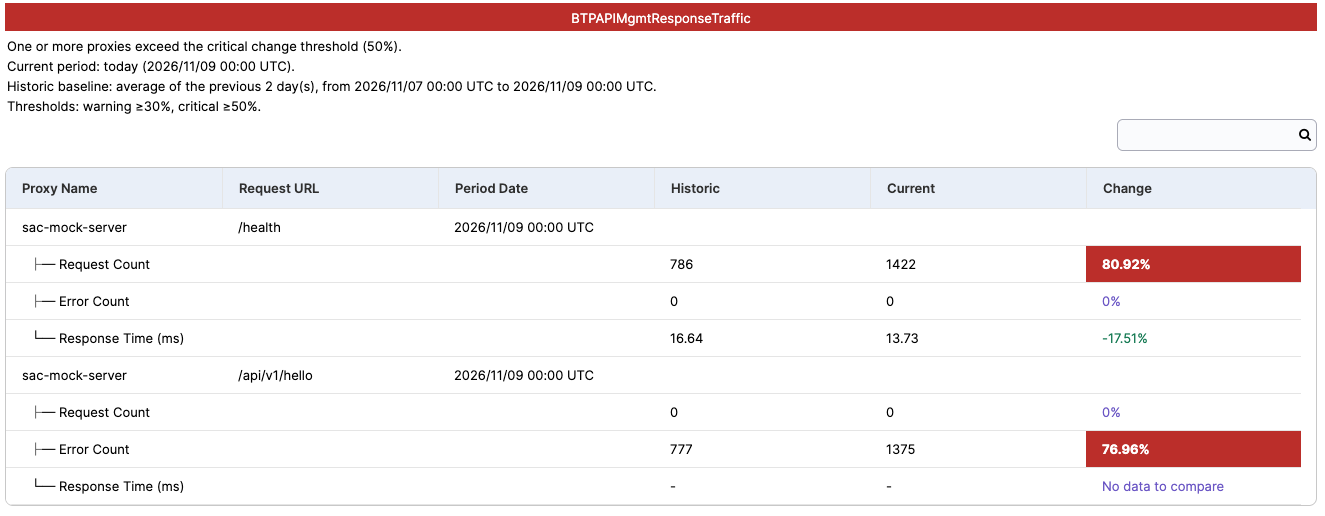
Compare each proxy and URL with previous periods, and treat a large change in either direction as a signal. Fixed thresholds struggle with APIs because normal traffic varies so much between proxies.
Request count, error count and response time carry most of the information. A rise in errors after a policy change or back-end deployment is the obvious case. Rising response time with steady traffic usually means a back end is degrading. A drop in requests is the case teams miss: a consumer whose call volume has fallen sharply produces few errors, so error dashboards stay green while the business process behind it slows or stops.
Choosing the comparison period matters. Daily comparisons catch sudden breaks, while weekly or monthly comparisons smooth out business cycles such as month-end peaks.
Certificates and the Developer Hub inventory
Expired certificates are the most predictable cause of outages at any API gateway. The Developer Hub inventory is different: it tells you who a change or an incident will hit.
Certificates held in API Management secure connections from clients and to target endpoints. Each has a fixed expiry date, so the right approach is two warning stages well ahead of time, with already expired certificates listed on their own. The same principle applies to certificates on destinations and trust settings, discussed in why SAP BTP destinations break.
The product inventory is visibility rather than fault detection. Knowing which applications subscribe to a product, which developer owns each application and who published the product means “can we change this?” gets a list of people to notify instead of a guess.
How does Avantra help with SAP API Management monitoring?
Avantra puts the gateway in the same view as the back ends behind it. Once API Management is connected to Avantra, it is monitored alongside SAP S/4HANA, SAP Cloud Connector and other SAP BTP services in one console, and its results reach the team’s notification and ticketing channels like any other alert.
The failing proxy, found first. Error counts per proxy over a period you choose show where to start, and the failing calls across all proxies show the URL, response code and frequency, with include and exclude lists for known noise.
Gateway or back end, at a glance. Each failing call carries its timing breakdown, so the policy team or the service owner gets the ticket, not both.
Shifts in either direction. Percentage change in request count, error count and response time per proxy and URL against previous days, weeks or months flags a sharp rise or fall against history.
Renewals started on time. Configurable warning and critical windows before certificate expiry, with expired certificates listed separately.
Who to tell before a change. API products with their publisher, subscribing applications, owning developers and the registered developers, ready as a notification list before a product changes or retires.
Configuration steps are in the Avantra documentation for SAP BTP.
Frequently asked questions
Which API Management signals should I alert on?
Alert on error responses per proxy over a period you choose, on the total of failing calls across proxies, on significant changes in request count, error count or response time compared with previous periods, and on certificates approaching expiry. Together these cover broken back ends, misbehaving consumers, performance regressions and avoidable outages caused by expired certificates.
How early should I be warned about certificate expiry?
Early enough to request, approve and install a replacement without rushing, which for most organizations means weeks rather than days. A two-stage approach works well: a warning that starts the renewal process, then a critical alert closer to the date. Certificates that have already expired should be listed separately so they cannot be missed.
Why does a traffic drop matter as much as a spike?
A sharp fall in requests often means a consumer’s call volume has collapsed, a client application has partly failed, or an upstream change broke a call that used to work. Error counts may stay low because the calls never arrive. Comparing traffic with previous periods catches sharp drops as well as spikes.
Can I see who consumes each API product?
Yes. An inventory of API products can list who published each product and when, how many applications subscribe to it, and which developer owns each application, alongside the registered developers. This is visibility rather than fault detection, but it answers the question every API owner faces before changing or retiring a product.
The gateway hears about every failure first; it may as well be the first place you look.
Talk with one of our SAP experts.