


Performance-Based Cloud Scaling

Multi-Cloud Multi-Tenant Management

SAP Hybrid Environment Management

Flexible Workflow Automation Engine

Monitor and Control SAP, SaaS, and Web Services
SAP cloud automation is the practice of scaling, starting, stopping, and managing SAP systems on public cloud infrastructure using real-time SAP performance data rather than infrastructure metrics alone. A cloud automation platform reads SAP-internal signals such as dialog response time, work process utilization, and batch queue depth, then triggers infrastructure actions through a workflow engine. Avantra runs SAP cloud automation across AWS, Microsoft Azure, and Google Cloud, alongside on-premise systems, from a single control point.
Key takeaways
- Cloud provider autoscaling reads infrastructure metrics. SAP cloud automation reads SAP application metrics, so scaling decisions match what SAP systems are actually doing.
- Scaling works in four directions: up, down, in, and out. Systems scale on performance KPIs and on schedule, including planned shutdown of non-production systems overnight and at weekends.
- One platform covers on-premise, single-cloud, multi-cloud, and hybrid deployments, with secure tenant separation for MSPs and shared-services teams.
- A workflow engine runs conditional sequences: operating-system commands, SAP component interactions, and wait-for-result checks, not just scheduled start and stop.
- Coverage extends past SAP to SaaS applications and any web service with a REST API.
- Right-sizing runs on SAP demand. Free work processes and idle batch queues flag over-provisioned instances for scale-in or shutdown.
Performance-based SAP cloud scaling
Performance-based cloud scaling adjusts SAP infrastructure capacity in response to SAP application KPIs, so you pay for the capacity your systems need at that moment rather than for peak provisioning.
Moving SAP workloads to AWS, Microsoft Azure, or Google Cloud introduces a gap. Native auto-scale tools read CPU, memory, and network metrics from outside the application. Those tools have no view into SAP work processes, dialog response times, or batch queues, so scaling decisions lag behind what SAP systems are doing. Elasticity depends on the infrastructure responding to SAP-internal demand.
Avantra closes the gap by monitoring SAP internals directly and feeding those signals into scaling actions. Scaling runs vertically and horizontally: up, down, in, and out. You define the KPIs and the thresholds. The platform executes the infrastructure change.
ScottsMiracle-Gro runs mission-critical SAP workloads on AWS, processing more than 3 billion data rows a week with a lean Basis team. After automating operations with Avantra, system refresh dropped from 4 days requiring 5 staff to 4 hours, and a single engineer now refreshes up to five SAP systems simultaneously. Monthly support tickets fell from more than 500 to under 50, a 90 percent reduction.
Ready to learn more? Watch our on-demand viewing of Zero-touch Automation – Rethinking SAP Technical Operations with Tyler Constable.
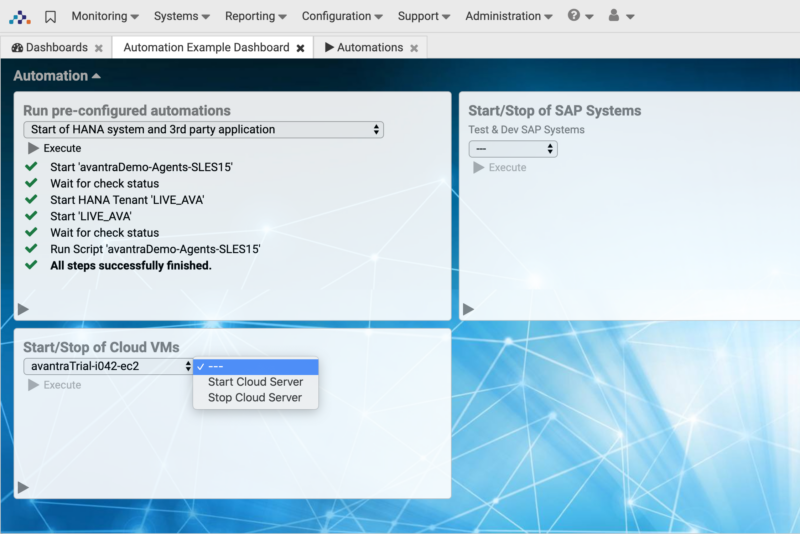
What SAP cloud automation solves by deployment model
| Deployment model | What breaks without automation | What Avantra does |
|---|---|---|
| On-premise only | Capacity is fixed to peak demand. Idle hardware absorbs cost year-round and manual start/stop sequences consume Basis time. | Automates daily checks and start/stop sequences. Surfaces spare capacity so hardware refresh cycles are planned on evidence. |
| Single public cloud | Native autoscaling reacts to CPU and memory, not SAP demand, so systems over-provision to stay safe. | Scales on SAP KPIs. Stops non-production systems outside business hours and restarts them on schedule. |
| Multi-cloud | No common view across providers. Performance and cost comparison between clouds is manual and inconsistent. | Single interface across AWS, Azure, and Google Cloud. Compares performance and cost between providers on the same metrics. |
| Hybrid (on-premise plus cloud) | Two toolsets and two operating models. Incidents crossing the boundary take longer to diagnose. | Unified observability and automation across both. Single sign-on and one set of thresholds for the whole estate. |
| RISE with SAP / Cloud ERP | Provider-managed systems reduce direct visibility while your team still owns the business outcome. | Extends observability into managed environments and integrates with SAP Cloud ALM so the hybrid estate stays under one view. |
| Multi-tenant (MSP or shared services) | Tenant separation is enforced manually. Reporting per customer or per division is rebuilt each time. | Secure multi-tenant management with per-tenant access separation and per-tenant reporting from one platform. |
Which SAP signals trigger automated cloud actions
|
SAP signal |
Condition |
Automated action |
|---|---|---|
|
Dialog response time |
Sustained above your defined threshold |
Scale application server capacity up |
|
Work process utilization (DIA) |
All dialog work processes occupied across an interval |
Add an application server instance (scale out) |
|
Delayed background jobs (JOBSTAT) |
Configured count of jobs delayed beyond a configured wait time (JobDelayedCountWarn/Crit, JobDelayedTimeWarn/Crit) |
Add background processing capacity when delayed-job thresholds are breached |
|
Scheduled low-usage window |
Nights, weekends, defined holiday periods |
Stop non-production systems and release the underlying instances |
|
Database log/data area growth forecast |
Predicted point when log or data area capacity is exhausted falls within a configurable forecast window (e.g. ADALogExWarn/Crit, HDBDisksLogExWarn/Crit), based on current growth rate |
Pre-provision capacity ahead of the predicted exhaustion point, rather than reacting after the threshold is crossed |
|
Filesystem growth |
Utilization crosses a warning threshold |
Run a cleanup workflow, then re-check before escalating |
Automated SAP right-sizing: identify and remove over-provisioned resources
SAP right-sizing matches cloud instance size and instance count to real SAP demand. An over-provisioned resource is an instance sized for peak load and left at peak size after SAP demand drops. Avantra identifies over-provisioning from SAP application signals. The platform then runs scale-down, scale-in, and shutdown workflows across AWS, Microsoft Azure, Google Cloud, and on-premise systems from one control point.
Why native right-sizing tools miss SAP over-provisioning
Native cloud right-sizing tools read CPU and memory from outside the application. Those tools see no SAP work processes, dialog response times, or batch queues. Without SAP data, a resize decision carries risk, so teams keep extra headroom. The headroom becomes a permanent cost. Avantra reads SAP internals directly, so each resize decision follows what SAP users and jobs need.
Over-provisioning signals Avantra tracks
| SAP signal | Over-provisioning pattern | Right-sizing action |
|---|---|---|
| Dialog work process utilization (DIA) | Free dialog work processes across a sustained interval | Remove an application server instance (scale in) |
| Dialog response time | Sustained response time well below your defined threshold | Move to a smaller instance size (scale down) |
| Delayed background jobs (JOBSTAT) | No delayed jobs across the batch window | Release added background processing capacity |
| Scheduled low-usage window | Non-production systems idle at night, at weekends, and on holidays | Stop the systems and release the underlying instances |
| Cross-provider comparison | Equal SAP performance at a higher cost on one provider | Move the workload based on side-by-side evidence |
Scale-in and shutdown workflows
Avantra runs right-sizing as a controlled sequence, not a single API call.
- Monitor. Read SAP KPIs against thresholds you set for each system.
- Confirm. Wait for sustained readings across an interval before acting.
- Prepare. Run SAP component and operating-system commands in the correct order.
- Act. Resize or release the instance through the cloud provider.
- Verify. Pause until a system check returns the expected result, then continue.
Production and non-production systems follow separate rules. A production system scales in on SAP demand. A non-production system shuts down on schedule and restarts before business hours.
Right-sizing SAP BTP
Over-provisioning extends past virtual machines. Avantra FinOps applies the same discipline to SAP Business Technology Platform with SAP FinOps and BTP utilization checks.
How SAP cloud automation differs from native cloud autoscaling
|
Capability |
Native cloud autoscaling |
SAP cloud automation |
|---|---|---|
|
Scaling trigger |
Infrastructure metrics: CPU, memory, network throughput |
SAP application KPIs plus infrastructure metrics |
|
View into SAP work processes |
None |
Direct, including dialog, background, update, and enqueue processes |
|
Scale directions |
Up, down, in, out on infrastructure signals |
Up, down, in, out on SAP demand and on schedule |
|
Planned downtime handling |
Requires separate scripting per provider |
Built into the workflow engine, consistent across providers |
|
Cross-provider comparison |
Not available. Each provider reports separately |
Performance and cost compared across providers in one view |
|
Non-SAP and SaaS coverage |
Limited to that provider’s own services |
SAP components, SaaS applications, and any REST web service |
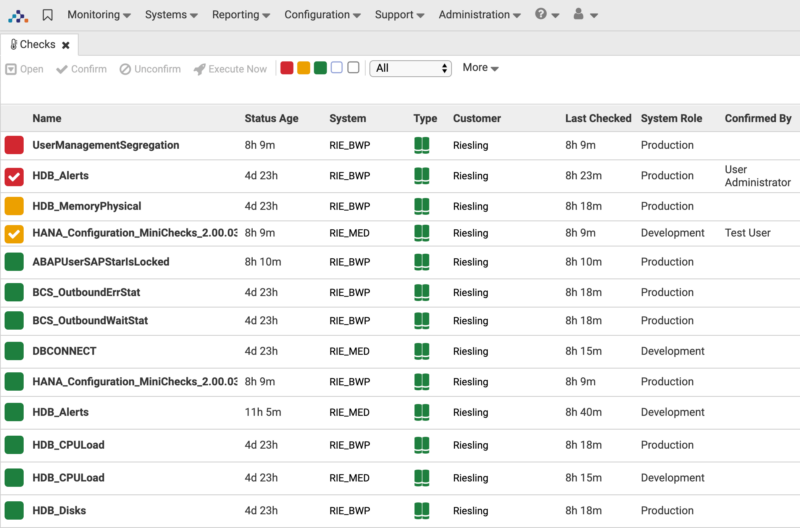
Multi-cloud and multi-tenant SAP management
Multi-cloud SAP management means operating SAP systems across two or more cloud providers through one interface, with consistent monitoring thresholds and secure separation between tenants.
Running SAP across multiple providers multiplies the operating model rather than the capability. Each provider reports differently, so comparing performance or cost between them turns into a manual reconciliation exercise.
Avantra presents every cloud environment through one secure, multi-tenant platform. You compare performance across providers on identical metrics, which makes placement and cost decisions evidence-based. Tenant separation supports multiple departments and, for MSPs, multiple customers from one deployment with access isolated per tenant.
Migros operates one of Switzerland’s most complex SAP estates: 125 SAP systems across 120 Unix and 230 Windows servers, supporting more than 13,000 users. Automating daily checks reduced server updates to 1 to 2 hours, cut post-processing of system copies from 3 hours to 3 minutes, and brought onboarding a new system into monitoring down from half a day to 30 minutes. Two potential production outages were prevented.
Hybrid SAP environment management
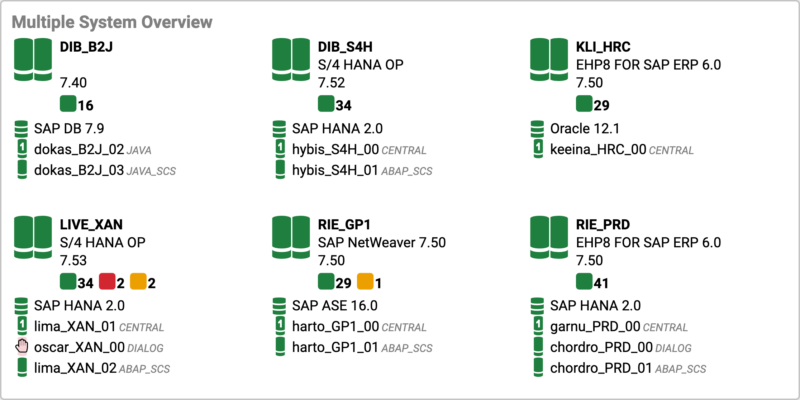
Hybrid SAP environment management covers SAP systems running on-premise and in the cloud at the same time, under one set of monitoring thresholds, one access model, and one automation engine.
Most enterprises now run hybrid by default. Core systems stay on private infrastructure for control and data residency. Newer workloads move to hyperscale providers for elasticity. The operational cost of hybrid is rarely the infrastructure. The cost is running two toolsets, two alert models, and two escalation paths, then diagnosing incidents crossing the boundary between them.
Avantra provides performance visibility, automation, and management across the full estate regardless of where each system runs. Single sign-on covers on-premise and cloud systems, and the same thresholds apply everywhere, so an alert means the same thing on both sides of the boundary.
SAP workflow automation engine
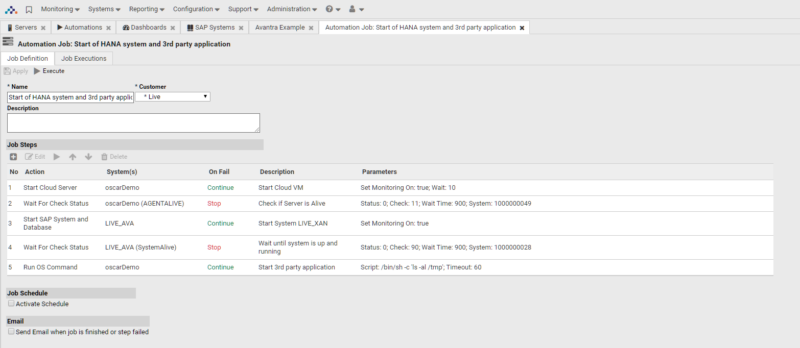
A workflow automation engine runs defined sequences of SAP and infrastructure actions with conditional logic, replacing the manual runbooks Basis teams execute by hand.
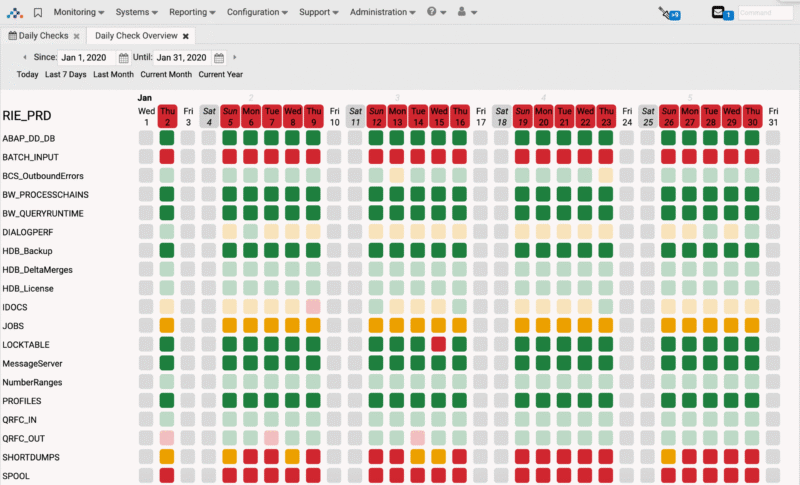
Scheduled start and stop is the entry point, not the destination. Avantra’s workflow engine runs operating-system-level commands, interacts with SAP components directly, and pauses until a system check returns a specific result before continuing. You define entire sequences with conditional branches, so a workflow reacts to what the system reports rather than assuming the expected outcome.
A workflow spins up or shuts down an SAP instance based on current performance KPIs. The same engine drives system refresh, patching sequences, and the daily check routines Basis teams otherwise run manually.
Monitoring SAP, SaaS, and web services
One monitoring and automation engine covers SAP components, enterprise SaaS applications, and any web service exposing a REST API.
No enterprise runs on SAP alone. Avantra monitors and controls all SAP systems and components, including SAP Business Objects, on-premise or in the cloud. Coverage extends to enterprise SaaS such as SAP SuccessFactors and SAP Concur, and to any web service with an API. Service dependencies crossing from SAP into SaaS stay visible in one place rather than splitting across tools.
FAQ
1. What is SAP cloud automation?
SAP cloud automation is the practice of scaling, starting, stopping, and managing SAP systems on cloud infrastructure using real-time SAP performance data. Actions trigger from SAP application signals such as dialog response time and work process utilization rather than from infrastructure metrics alone.
2. How does SAP cloud automation work?
SAP cloud automation works in three stages. A monitoring layer reads SAP-internal metrics continuously. A rules layer compares those metrics against thresholds you define. A workflow engine then executes the infrastructure action, such as adding an application server, stopping a non-production system, or running an operating-system command, and verifies the result before continuing.
3. How is SAP cloud automation different from AWS, Azure, or Google Cloud autoscaling?
Native cloud autoscaling reads infrastructure metrics such as CPU and memory from outside the application. SAP cloud automation reads SAP-internal metrics, so scaling matches actual SAP demand. Native tools also handle one provider each. An SAP cloud automation platform applies the same thresholds and the same workflows across AWS, Microsoft Azure, and Google Cloud, plus on-premise systems.
4. Does SAP cloud automation work in hybrid environments?
Yes. Hybrid support is the standard case rather than an exception. Avantra monitors and automates SAP systems running on-premise and on cloud infrastructure at the same time, with single sign-on and one set of thresholds across both, so an alert carries the same meaning wherever the system runs.
5. Does one platform manage SAP across multiple cloud providers?
Yes. A multi-cloud SAP management platform presents every provider through one interface and compares performance and cost across providers on identical metrics. Avantra integrates directly with hyperscale providers including AWS, Microsoft Azure, and Google Cloud.
6. Which SAP metrics trigger automated cloud scaling?
Typical triggers include dialog response time, dialog work process utilization, background job queue depth, filesystem growth, and scheduled low-usage windows such as nights and weekends. Thresholds are defined per system, so production and non-production systems follow different rules.
7. How does SAP cloud automation reduce cloud cost?
Cost falls in two ways. Systems scale down or in when SAP demand drops rather than staying provisioned for peak. Non-production systems stop entirely outside business hours and restart on schedule, releasing the underlying instances. Both actions depend on SAP-aware signals, since infrastructure metrics alone understate how much capacity is genuinely idle.
8. Is SAP cloud automation suitable for managed service providers?
Yes. Secure multi-tenant management separates access and reporting per tenant, so an MSP manages multiple customers from one deployment. The same model supports large enterprises separating divisions or regions.
9. How does Avantra automate SAP right-sizing and identify over-provisioned resources?
Avantra compares SAP application KPIs against thresholds you set for each system. Sustained free dialog work processes, low dialog response time, and empty batch queues flag an over-provisioned system. The workflow engine then scales the system down or in, or stops non-production systems on schedule. The same rules apply across AWS, Microsoft Azure, Google Cloud, and on-premise systems. For SAP BTP, Avantra FinOps runs utilization checks on platform usage.
Avantra Brings the Full Benefits of the Cloud to SAP Systems.
Learn more about how Avantra dynamically and automatically adjusts cloud capacity for your SAP systems.
Real results. Across real landscapes.

“We needed better access to data about critical operations… our engineers were so busy reacting to day-to-day urgency, we had to outsource more strategic activities…”

“By using Avantra, we have been able to prevent serious failures in our SAP production systems. Today, we only need 1 to 2 hours to install server updates, we have been…”