

I spend a lot of my time with customers, enterprise and service providers alike, and over the last two years the same sentence has come up in almost every one of those conversations:
“We don’t run the infrastructure any more. We still own the service level.”
That split is what this release is about. RISE has been a sound move for a lot of the customers I talk to, and handing the infrastructure to a provider who specialises in running it, is a reasonable thing to do. It does, though, divide an estate into a layer you operate on and a layer you depend on, and most monitoring was designed for a world where those were the same layer.
So the operating system underneath a RISE host sits outside your tooling. The Web Dispatcher that every browser session opens through is managed for you, which means no agent on it and no SAPControl access in the model. The identity tenant signing your users into S/4HANA Cloud, SuccessFactors and Ariba is something operations has never had a reason to look at – right up until the Monday it stops working!
None of that is anyone behaving badly. It is a boundary that monitoring has not caught up with yet. Every team I talk to has quietly accepted those gaps because there was no supported way to close them. I do not want us to accept them.
So, Avantra 26 H2 LTS, our latest long-term-support release, goes after all three. And it opens the whole estate up to the AI assistant your engineers are already using.
Bring your own AI (MCP)
Bring your own AI is generally available for Avantra AIR subscribers in 26 H2 LTS.
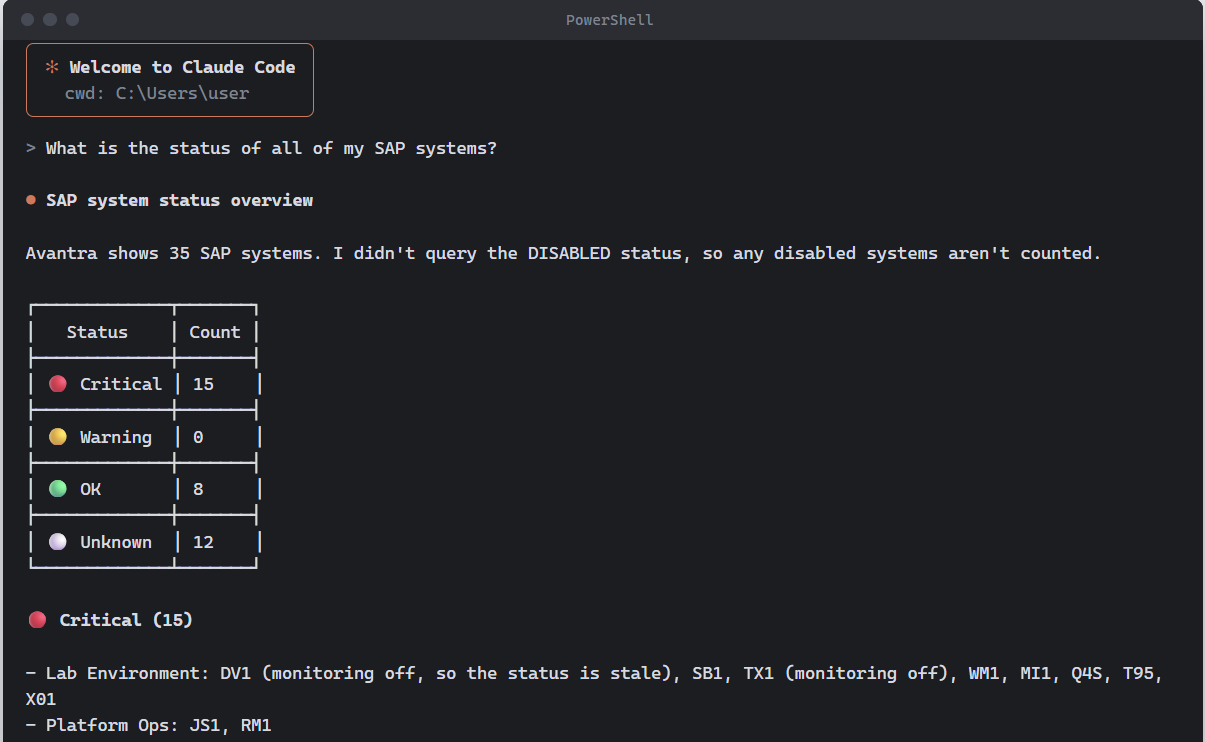
Your engineers already have an assistant they trust. It just has no idea what is going on in your SAP estate. Which is why people end up pasting screenshots of our console into a chat window, and I would much rather give them a proper answer, than pretend that is not happening.
Avantra ships an MCP server, built on the open Model Context Protocol, as part of the platform. Point any MCP-compatible assistant, agent, or framework at it with an authenticated Avantra server user, and it answers from the live estate model, 260+ SAP checks, plus whatever your own team has built, and the operational history behind them.
In practice that sounds like: what is broken right now and what do I do about it; why is this check failing and has it failed on this system before; which of my customers have a HANA backup problem this morning; show me every system where the filesystem trend says we run out inside a month; summarise overnight for the nine o’clock handover with one line per customer.
Your AI reads your estate. It does not act on it. The connection runs inside your own Avantra platform, however, the assistant sees only what the Avantra user it connects with is already permitted to see. This means, your existing permissions and customer separation apply unchanged and every request is logged. Write actions are off by default and require explicit opt-in.
I know some of you have security teams who have blocked every AI tool that has come near them. Show them this last paragraph. This is how you’ll benefit from AI safely with Avantra – providing your agentic execution layer that is safe and auditable.
It is part of Avantra AIR, alongside AI root cause analysis and next best actions, which are generally available. No separate licence and no separate line item is needed. If you have AIR, you have access to the MCP today to bring your own AI.
Seeing the layer underneath
Now I want to tell you about the update that excites me to no end, because it took the most determination to get it exactly right.
A filesystem fills up. Memory pressure builds over a fortnight, while a host runs hot. None of it reaches your monitoring, because your monitoring stops at the application. The first real signal is a user picking up the phone, and by then the conversation is about an outage, which could have been a mere warning three days earlier.
The obvious answer is an agent on the host, and in RISE you cannot have one. So we stopped trying. Remote server monitoring collects CPU, memory, filesystem, swap and load through the SAP components already running on that host: your ABAP system, your HANA database or the SAP Cloud Connector. Nothing gets installed. No operating system credentials are required. Instead, hosts are discovered automatically from the systems Avantra already monitors, and you control per customer where that discovery is switched on.
The checks, thresholds, alerting, dashboards, service level reports and predictive resource planning are the ones you already run everywhere else. That was the point. RISE hosts stop being the exception in every report you produce.
One story that stuck with me: At x1F, a financial services managed service provider, Avantra caught a filesystem saturating before it would have taken production down. Those minutes were the whole difference between a routine intervention and an outage. That is exactly the class of problem operating system metrics catch, and exactly the class that has been invisible since the first RISE migration.
The front door
The Web Dispatcher has a particular way of failing. I think everybody reading this has lived through it at least once.
A connection pool saturates at month end. A request queue backs up. A TLS certificate on the HTTPS port expires and every browser in the company throws a warning at the same moment. And every system behind the dispatcher reports green while nobody can log in, so the investigation starts in completely the wrong place.
In RISE there is no agent on that host and SAPControl access is not part of the arrangement, for reasons that make sense from where SAP is standing. The effect on your side is that the component which fails in front of the healthy ones sat outside the monitoring scope, while sitting squarely inside the service level. That never sat right with me.
You can now create an agentless SAP System of type Web Dispatcher, give it the administration URL and an administration user, and Avantra does the rest.
You get availability from a live login, connection, queue, and worker thread usage, against the configured maximum with current and peak values, and daily certificate validity checks on every active HTTPS service and on the PSE store. Avantra observes the dispatcher’s certificates and, where you enable it, can update the PSE certificates it holds.
The detail I care most about: the check names, parameters and thresholds are identical to the SAPControl path. Nothing new to learn, no thresholds to re-derive. A dispatcher in RISE reports alongside one on-premise. If you already have dispatchers monitored the old way, the RISE ones simply join them.
The layer nobody owns
Identity failures are the most expensive kind, and they are almost never mysterious.
A SAML signing certificate reaches its end. An API secret rolls over quietly on a Sunday. Nobody set a reminder, because the tenant is not something operations ever look at. Monday morning, the service desk fills with people who cannot get into anything, every system reports perfect health, and it takes an hour to work out the problem is upstream of all of them.
SAP Cloud Identity Services is now a Cloud Service type in Avantra. You add the tenant with an API client credential and Avantra collects daily through SAP’s public APIs, the Identity Directory SCIM API and the Application Directory. No unsupported interfaces, which was a hard requirement for us, rather than a nice-to-have.
The daily cycle covers tenant reachability, SAML2 signing and encryption certificate validity for every application in the tenant, application API secrets approaching expiry with the date, SAML2 digest algorithms known to be weak, and active users who have not signed in inside a window you set. The troubleshooting and audit logs are in there, too.
These are configuration-based checks. They tell you that a certificate, secret or algorithm is going to cause a failure, well ahead of time. They do not perform a synthetic login, and we surface the finding rather than changing your tenant. If you run one tenant per customer, this is finally one view of what expires when, across all of them.
What I hope you take from this release
Four capabilities. One idea underneath all of them: You cannot be held to a service level for something you cannot see.
So: know what is actually running, including the parts you do not own. Act on it through automations your team reviewed and switched on. Then prove what happened, in a report your customer or your board can read without a translation layer.
And when something does need to go to whoever runs the infrastructure, you arrive with the named host, the metric, the timestamp and the trend. That is a faster conversation for both sides than one that starts with a suspicion.
All four are available in Avantra 26 H2 LTS now. Talk to your account team about switching them on, and if there is a gap in your estate we have not closed yet, tell them that too. That feedback is genuinely how this release got its shape.