

Ask an SAP Basis or security team how they control access to their ERP, and you’ll get a confident answer. User master records, PFCG roles, firefighter IDs, separation of duties policies, and an audit someone reviews regularly. Decades of audit findings have hardened those controls.
Ask the same team who can deploy code to their BTP subaccounts, and the answer is far from so confident.
For most customers, BTP first arrived as a build environment: a replacement for PI/PO, a place to extend S/4HANA, or try out Joule Build. At first, it was a sandbox, so it got sandbox-grade identity management. But users, roles and separation of duties matter just as much where your extensions and integrations are built and run. And BTP handles all three differently than the ABAP stack does.
BTP doesn’t keep its own user store the way ABAP systems do; every login is redirected to an identity provider. Users split into two populations: platform users who administer and build, and business users who consume the applications. Roles are defined separately at the global account and subaccount level, and Cloud Foundry org and space roles sit beside them as a third layer.
Each of those design choices makes sense on its own. Together, they create gaps even SAP-experienced teams miss. Here are five of them, and what to watch for in each.
Sneaking in through the SAPdoor
Every BTP subaccount trusts the SAP ID service out of the box. It’s the shared public identity provider behind accounts.sap.com, the same one that manages S-users and community accounts. That trust is pre-configured, and it stays in place after you connect your corporate identity provider unless someone deliberately switches it off for user logon.
That’s the SAPdoor.
Most customers do the right thing: they set up a tenant of SAP Cloud Identity Services (IAS), federate it with Entra ID or Okta, and let joiners, movers and leavers flow from HR. SAP itself recommends a custom IAS tenant for production use.
But during the early build phase, admins can grant access to S-users directly in the cockpit. Those assignments don’t disappear when the corporate identity provider arrives. And an S-user belongs to SAP’s identity store, not yours. When a consultant’s engagement ends, or an employee leaves but keeps an S-user for SAP for Me, their BTP role assignments can survive too.
A few things make Sapdoor entries possible:
- Anyone can self-register in SAP ID service, so the identity itself isn’t governed by your lifecycle process.
- SAP ID service identifies users by email address rather than by your user ID, so these users may not line up neatly with HR or directory records.
- Platform users, including global account and subaccount administrators, often still log on through the default identity provider, because that’s how the account was set up.
What to check: Is the default identity provider still available for user logon in productive subaccounts? Which role collection assignments belong to users from the default origin? Who are your global account administrators, and do all of them still work for you?
Users lurking in the shadows
BTP keeps a local record of every user authorized in a subaccount. SAP calls them shadow users. With the trust configuration’s shadow-user option enabled, the record appears automatically the first time someone logs on.
Shadow users are how BTP attaches role collections to people it doesn’t own. They’re also where roles can hide, because there are two ways to grant a role collection and most teams end up using both:
- Group mapping. A group in IAS or the corporate identity provider maps to a role collection. Access follows group membership, and the cockpit doesn’t show it as a direct assignment on the user.
- Direct assignment. An admin adds the user to the role collection in the cockpit. It’s quick and visible, and it sits entirely outside your identity lifecycle.
Drift lives in the gap between the two: a mover loses an AD group and the mapped access goes with it. But the direct assignment someone added “temporarily” during go-live is still there.
Cloud Foundry adds a third layer. Org Manager, Space Manager and Space Developer roles are assigned separately from role collections, and they control who can deploy and configure applications. They are easy to forget to review, yet they grant high-privilege access by any measure”.
What to check: How many direct assignments exist alongside your group mappings, and who reviews them? Would you know if a user or role assignment changed tonight? How many Org Managers do you have, and why?
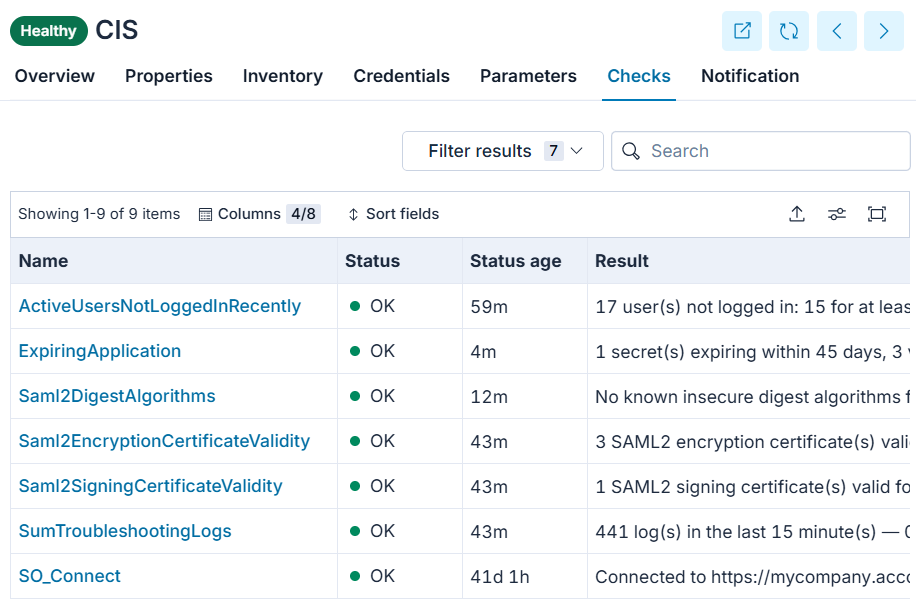
Avantra watches for exactly this case. Built-in checks flag when the number of Org Managers passes a threshold, and a custom check alerts when users or role assignments in a subaccount change or have high-privilege Cloud Foundry roles.
Expired certificates of trust
Identity in BTP runs on certificates, and certificates expire. When one does, it can look like an outage, not an identity problem.
A typical hybrid landscape has at least five classes of certificate holding its identity chain together:
| Certificate | Where it lives | What breaks when it expires | The catch |
|---|---|---|---|
| Identity provider signing certificate | IAS or corporate IdP, referenced by every SAML trust | Logons to applications that trust it fail with invalid-signature errors | Renewing it on the IdP side doesn’t update every trust that relies on it |
| Cloud Connector subaccount certificate | Cloud Connector | The tunnel to on-premise systems drops, and every integration through it stops | Renewal uses a named user’s credentials; older HA setups didn’t refresh the shadow instance |
| Cloud Connector system and CA certificates | Cloud Connector, trusted by ABAP backends | Principal propagation SSO to on-premise systems fails | Two teams own the two ends of the trust |
| Destination trust certificates | BTP subaccount | Destinations that pass the user’s identity downstream fail | Rarely on anyone’s renewal calendar |
| Service binding X.509 credentials | Service bindings and keys | Applications and integrations lose access to the services they call | Rotation isn’t always automatic, even where teams assume it is |
Client secrets have the opposite problem. They don’t expire, so they live indefinitely in pipeline variables and config files. Teams that try to rotate them by unbinding and rebinding have found that some services hand back the same secret.
The identity angle can be the tricky bit: renewing a Cloud Connector certificate means authenticating as a user with the right subaccount role. If that was one administrator’s personal account, the renewal stalls the day they leave. And the full certificate inventory spans IAS, the Cloud Connector, BTP subaccounts and STRUST on the ABAP side. Those usually belong to different teams.
What to check: Do you have one inventory of every certificate in the chain, with expiry dates? Is each one owned by a role or team rather than a person? Which credentials are static secrets, and when were they last rotated?
Avantra monitors expiry of the SAML2 metadata certificates used for BTP destination trust, with warning and critical thresholds, alongside certificate monitoring on the ABAP side including Cloud Connector. Customers with Avantra deployed comprehensively across the estate enjoy automatic certificate management, preventing identity related outages due to certificate expiration.
Skeleton keys
Not every identity in BTP is a person. Integrations, CI/CD pipelines, monitoring tools and AI agents authenticate with service keys, client credentials and technical users. They often hold broader access than any human user and are easily forgotten in a human-centric access review.
Three patterns turn these into skeleton keys:
- Borrowed human credentials. A named administrator’s S-user and password configured into a tool or pipeline. It breaks when that person leaves, or, worse, it doesn’t.
- Static secrets. A client secret pasted into a pipeline variable can outlive the project that created it.
- Policy gaps. SAP’s newer policy-based authorization model for IAS-based applications doesn’t yet cover technical users. They fall back to role collections and service keys, which is where governance is weakest.
Separation of Duties may be further compromised. ERP SoD is functional: the person who creates a vendor shouldn’t also pay it. Functional rulesets are built for that, and they don’t see BTP’s platform-level conflicts. For example:
- A user who is both Subaccount Administrator and Space Developer can deploy code and then grant themselves the roles to run it.
- A user who can manage trust configuration can add an identity provider they control.
- A user who can manage destinations can change where, and as whom, your integrations connect to on-premise systems.
These are technical conflicts, and they need technical controls: knowing who holds which platform roles and being alerted when those change.
What to check: Which technical identities can deploy, configure trust or manage destinations? Are any of them using human user credentials? Who holds administrator and developer roles in the same subaccount?
Vanishing without a trace
With core ERP, an access change leaves a trail: a ticket, an approval, a change in SU01 or GRC tooling, and a Security Audit Log entry. In BTP, two things break that trail.
The ticket. Access governed through IAS groups and Identity Provisioning can follow your ITSM process: request, approve, add to group, provision on the next scheduled job. But anyone with admin rights in the cockpit can assign a role collection directly, and that change never touches ServiceNow. Your ITSM records show what was requested. The subaccount shows what exists. Someone needs to compare the two.
The trace. The BTP audit log keeps events for 90 days by default. Longer retention needs the premium edition of the Audit Log service, or an export through the Audit Log Retrieval API into your SIEM. For a SOX-scoped team running annual access reviews, 90 days doesn’t cover the audit period.
What to check: Can you reconcile current role collection assignments against approved requests? Where do your BTP audit events go after 90 days? When someone makes a direct assignment, does anything raise an incident?
This is where monitoring and ITSM meet. Avantra can alert on unexpected changes to BTP users and role assignments and route them into ServiceNow, so an out-of-process change becomes a ticket instead of a surprise at audit time.
The ghost of identity future
For hybrid customers, BTP identity management is a concern today. Mainstream maintenance for SAP Identity Management 8.0 ends on December 31, 2027, with extended maintenance available to 2030 at extra cost. SAP hasn’t named a direct successor.
Instead, it points customers to Microsoft Entra ID for enterprise-wide identity lifecycle, with SAP Cloud Identity Services as the SAP-specific integration layer. Identity migrations are a complex undertaking for larger organizations, often rivalling an ERP project in scope and impact.
So, identity across the SAP estate is being re-plumbed now, just as BTP use is growing. That makes now the moment to decide whether BTP sits inside your identity governance or beside it. Six steps get you most of the way:
- Close the Sapdoor. Move productive subaccounts and platform users to your IAS tenant and switch off the default identity provider for logon where you can.
- Pick one assignment path. Grant access through groups and treat every direct assignment as an exception someone reviews.
- Automate the certificate chain. List every certificate end to end, then bring them under monitoring and management with solutions like Avantra.
- Treat technical identities as first-class. Prefer certificates over static secrets, rotate what you can, and never reuse a human’s credentials.
- Watch the platform roles. Alert on changes as they happen, rather than waiting for a quarterly review.
- Keep the evidence. Export audit events beyond the 90-day default.
Identity management in BTP is the requirement nobody planned for, but that’s exactly why it needs watching. For solutions to automate and manage the maintenance of SAP, BTP and your SAP hybrid estate, reach out to us for a demonstration and see how Avantra is designed to manage and run SAP deployments.
To see how Avantra automates SAP operations across on-premises, Cloud ERP Private and BTP, visit the platform page or talk to one of our SAP experts.