

Scotts Miracle-Gro cut SAP system refresh from 4 days to 4 hours with Avantra. Read the case study
Trusted observability and hybrid automation for SAP OPS








Missing your LaMa?
SAP Landscape Management 3.0 reaches the end of mainstream maintenance on 31 December 2027, with no extended maintenance phase. SAP Cloud ALM is the designated successor for application lifecycle management, but LaMa’s automation for customer-operated systems has no direct equivalent in it. The table below shows where each LaMa function goes.
LaMa vs SAP Cloud ALM vs Avantra
| LaMa function | SAP Cloud ALM | Avantra |
|---|---|---|
| System provisioning and cloning | Not covered for customer-operated systems | System copy through database restore templates, including point-in-time recovery |
| System refresh and post-copy automation (PCA) | Not covered | Full ABAP system refresh with control over which data is preserved, plus BDLS logical system change and client settings as reusable steps |
| Start, stop and check of managed systems | Not covered for customer-operated systems | Start/stop for SAP systems, instances, databases and cloud servers, alongside continuous automated checks |
| Landscape visualization and inventory | Landscape information for systems connected to Cloud ALM | Monitored objects created automatically from AWS, Azure, Google Cloud and ServiceNow, with dynamic system groups and system change tracking |
| Custom automation and process management | Not covered | Workflow engine with built-in steps, ready-made templates and custom JavaScript steps, run manually, on a schedule, from an alert or through the API |
| Infrastructure integration (cloud and virtualization) | Not covered | Integrations with VMware, AWS, Azure and Google Cloud |
For the full comparison, including monitoring, patching and ITSM, see our SAP LaMa end of life replacement guide.
SAP LaMa transition readiness checklist
Use this checklist to plan your move off SAP LaMa before 31 December 2027. Teams that finish steps 1 to 5 in 2026 leave room for a parallel run in 2027.
- Inventory every LaMa operation you run: system copies, refreshes, mass start/stop, provisioning and custom operations.
- Record how often each operation runs and which systems it touches, so you can rank them by business impact.
- Export your post-copy automation (PCA) task lists and custom hooks. These usually hold the most undocumented logic.
- List the infrastructure adapters LaMa uses, such as VMware, AWS, Azure, Google Cloud or storage snapshots.
- Note which LaMa operations are triggered from other tools, such as ServiceNow, job schedulers or scripts.
- Assign each operation a future home: SAP Cloud ALM, a landscape automation platform, or retirement.
- Pick your two most complex operations, usually a full production-to-QA refresh, for a proof of concept.
- Rebuild operations in non-production first, then run them in parallel with LaMa and compare results.
- Keep an audit trail for every rebuilt operation (who ran it, when and with what result) so compliance evidence continues across the cutover.
- Set a LaMa decommission date before 31 December 2027, including retiring the NetWeaver AS Java host it runs on.
Extending Coverage as SAP's Landscape Tools Evolve
LaMa has been a staple of SAP operations and deployments for a generation. Looking to the future, Cloud ALM and Cloud Application Services (CAS) options directly address the needs of SAP customers moving to Cloud ERP.
As SAP’s roadmap moves toward Cloud ALM and Cloud Application Services (CAS), support for the Landscape Management solution ends in 2027. Customers planning their transition timeline can start scoping their path forward now.
For SAP customers with existing on-premises systems, plans for extended hybrid operations or complex transition and transformation projects, an automation layer that spans the full landscape makes these operations dramatically easier to manage.


Extending Cloud ALM
For SAP customers planning a Cloud ERP centric future, Cloud ALM is often the first and best choice.
More complex deployments may require extensions and integration with Cloud ALM:
- Managing legacy on-premises systems until decommissioning
- Long-term plans for hybrid operations
- Customers adopting Cloud ERP Private without Cloud Application Services (CAS) options
- Heavily regulated industries such as GxP and Defense
- Multi-tenant management
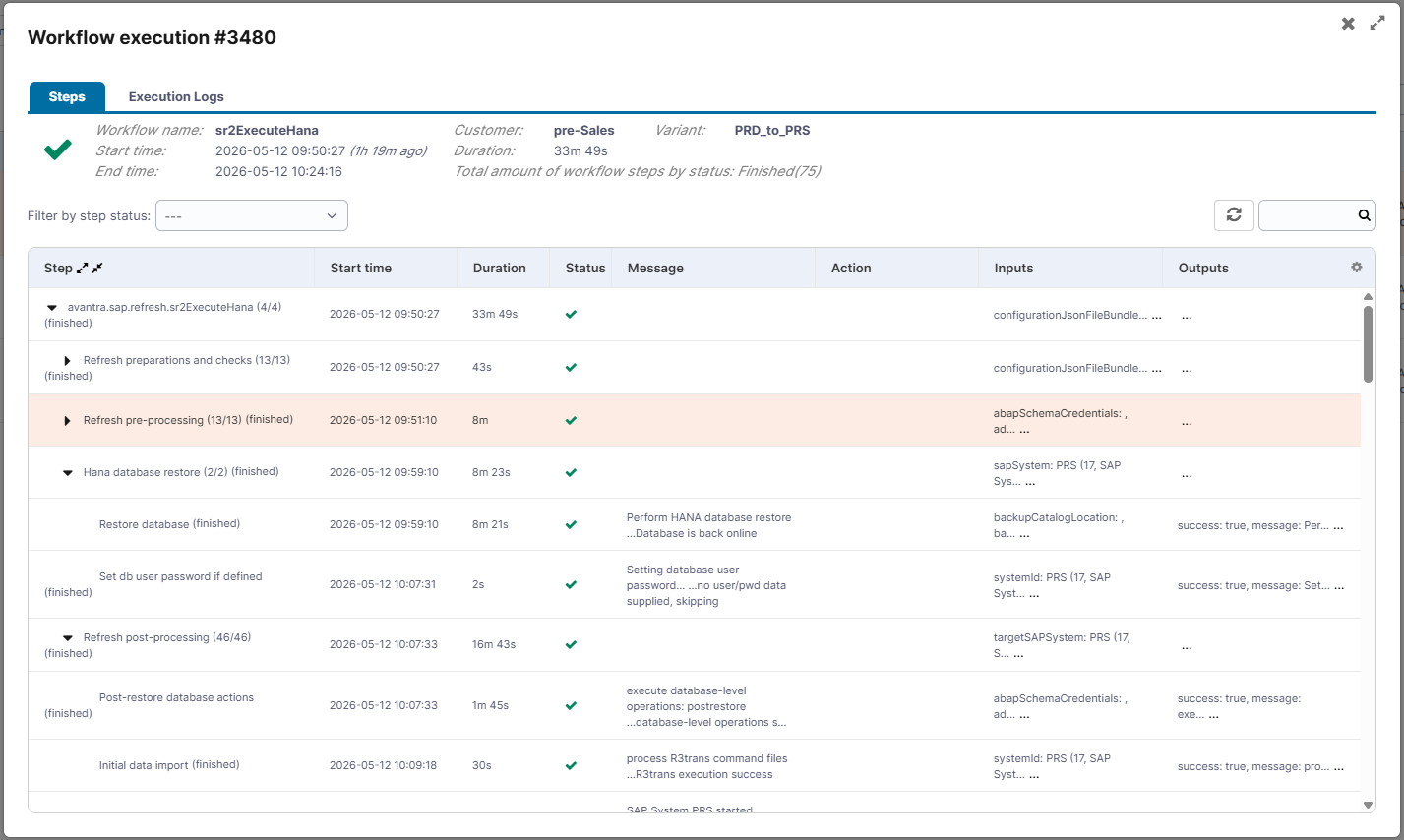
System Refresh Automation
One-click, fully automated system refresh.
Avantra customers easily support Project and QA teams with fresh test data and ready to use non-production systems.
Automate support across migration, upgrade, HA/DR, testing and training systems. Support on-demand system refresh: no matter how complex, Avantra automates the job.
Massively reduce the time and Basis team commitment for this common activity.
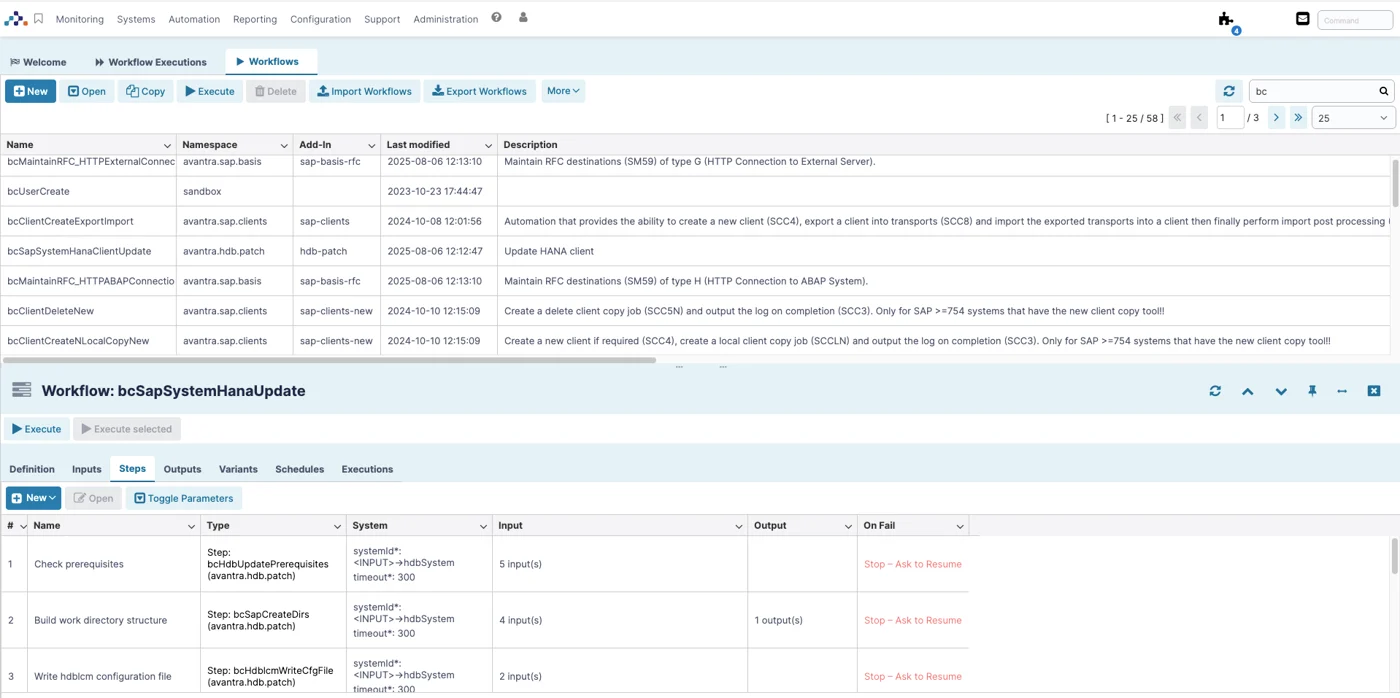
Systems Orchestration
Backups, provisioning, start and stop – SAP landscapes require systems orchestration to make sure it’s done right.
Let Avantra automation turn this repetitive task into an automated, consistent runbook execution, eliminating manual effort each time it’s run.
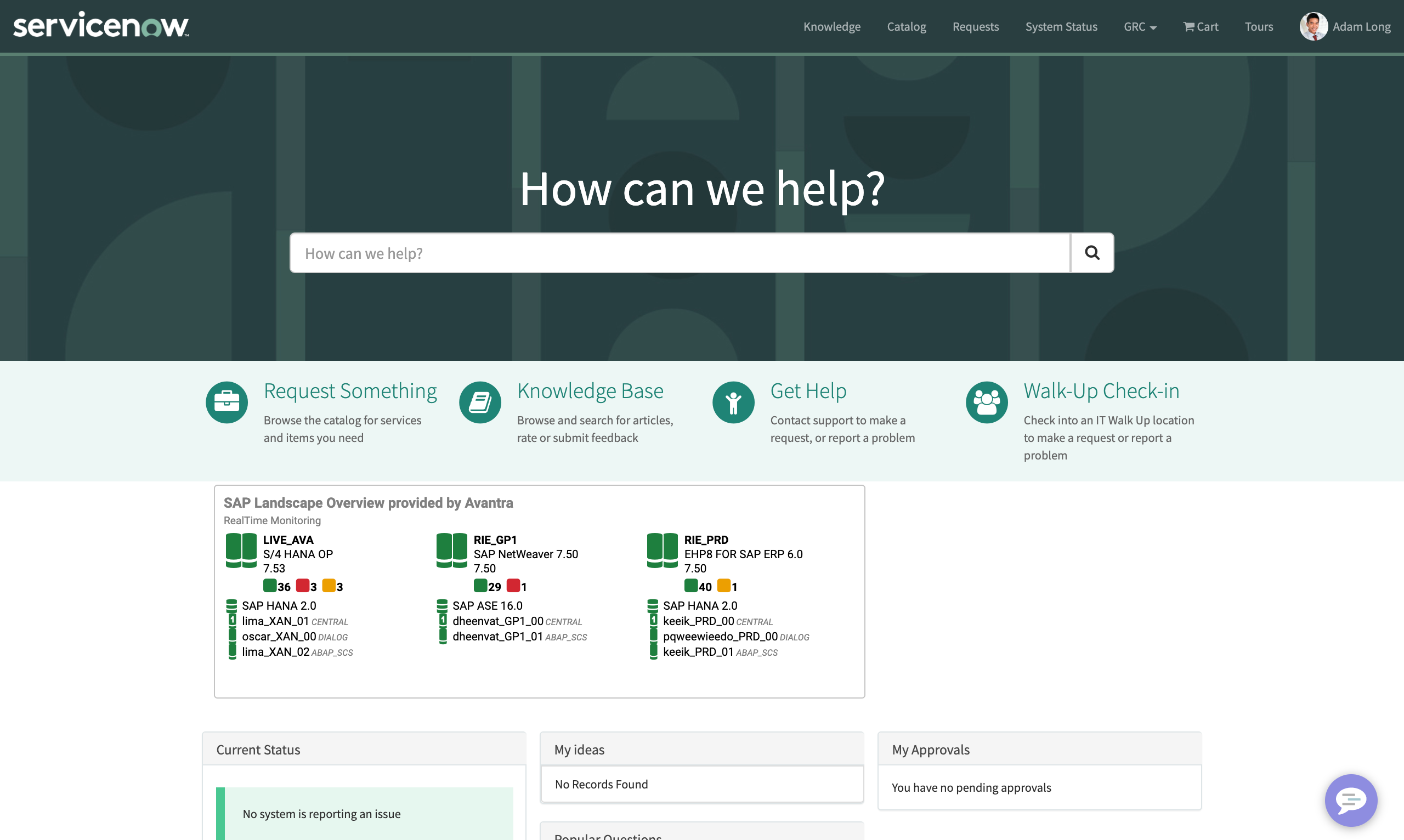
ITSM Integration
Orchestrate everything across the enterprise from ServiceNow including SAP.
Trigger Landscape Management automation from ServiceNow and keep tickets up to date automatically for system actions, upgrades, patches and service requests.
Learn more about ServiceNow Integration with Avantra
SAP Landscape Management and Automation for Security
Avantra automates many regular security and compliance activities, managing SAP landscapes with less Basis team effort across on-premises, hyperscaler and Cloud ERP deployments

Multi-Tenant Coverage
For the most complex large enterprise customers and SAP Managed Services Providers, managing multiple customer tenants and landscapes is a must.
Provide end users with tenant-specific views and centralize control across multiple Cloud ALM tenants from a single point of control.
Avantra tightly integrates with Cloud ALM, leveraging the existing Cloud ALM configuration as discovery, and automatically configuring Avantra to provide a single point-of-observability, control and policy across any combination of Cloud ALM instances. Built-in multi-tenant concepts correctly separate resource access and reporting by tenant.
Learn more about Avantra for Managed Services Providers
Scotts Miracle-Gro’s Achieves a 95% Faster System Refresh
Managing massive SAP workloads on AWS, ScottsMiracle-Gro’s lean IT team struggled with manual, resource-heavy system refreshes that took 4 days and required 5 staff members. By implementing Avantra’s intelligent automation, they slashed refresh times down to just 4 hours.
From 4 Days to 4 Hours
Industry-Leading Uptime: Nagarro’s SAP Operational Breakthrough
“Our success factors are a very high level of expertise and passionate customer responsibility. Our customers experience system availability of 99.995% thanks to Avantra.”
99.995% Uptime for Customers
x1F Achieves True SAP Automation with Avantra
“What sealed the deal was that Avantra not only solved our biggest pain point in monitoring but also opened the door to automation, which was critical for our future.”
60–80% Reduction in Manual Time for System Refreshes
Frequently asked questions
Where does Avantra fit in with the standard SAP landscape management tools?
When should SAP customers consider Avantra?
How does Avantra compare to LaMa for our existing on-premises deployments?
Functionally Avantra covers the same core landscape management functions as LaMa – plus additional automation depth. Avantra is designed to provide common landscape management functions including backup orchestration, start-and-stop, patches and upgrades orchestration and more, just like LaMa. Avantra extends this basic functionality to full System Copy/Refresh automation, sophisticated provisioning capabilities, certificate maintenance automation and more.
Avantra provides continuity for on-premises and hybrid landscape automation as SAP’s landscape management roadmap advances toward Cloud ALM and Cloud Application Services (CAS) — including through LaMa’s 2027 support timeline.
What happens to SAP LaMa after 31 December 2027?
SAP Landscape Management 3.0 stops receiving mainstream maintenance, including security patches, support tickets and compatibility updates for new kernel and database releases. SAP has not offered an extended maintenance option for LaMa.
Can we run Avantra alongside LaMa during the transition?
Yes. Avantra runs independently of LaMa, so teams can rebuild operations in Avantra, run both in parallel on non-production systems, and compare results before switching over.
Does Avantra need Solution Manager or Cloud ALM to automate landscape operations?
No. Avantra runs its own server and agents, so it automates system refresh, start/stop and backup tasks without Solution Manager or Cloud ALM. Where Cloud ALM is in place, Avantra integrates with it and maps Cloud ALM systems to Avantra systems.
Which LaMa operations should we migrate first?
Start with the operations that run most often or carry the most risk, usually system refreshes from production to QA. Rebuilding these first gives the most time to test before the 2027 deadline.